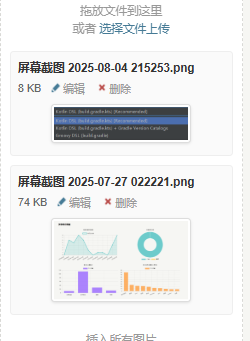
定位文件file-upload.php和file-upload-js.php。修改之前记得备份文件。更改了一下排序顺序,刚上传的放在最前面。如果是图片就可以简单预览缩略图。
更改file-upload.php
<?php if(!defined('__TYPECHO_ADMIN__')) exit; ?>

<?php
if (isset($post) || isset($page)) {
    $cid = isset($post) ? $post->cid : $page->cid;

    if ($cid) {
        \Widget\Contents\Attachment\Related::alloc(['parentId' => $cid])->to($attachment);
    } else {
        \Widget\Contents\Attachment\Unattached::alloc()->to($attachment);
    }
}
?>

<div id="upload-panel" class="p">
    <div class="upload-area" draggable="true"><?php _e('拖放文件到这里<br>或者 %s选择文件上传%s', '<a href="###" class="upload-file">', '</a>'); ?></div>
    <ul id="file-list">
    <?php while ($attachment->next()): ?>
        <li data-cid="<?php $attachment->cid(); ?>" data-url="<?php echo $attachment->attachment->url; ?>" data-image="<?php echo $attachment->attachment->isImage ? 1 : 0; ?>">
            <input type="hidden" name="attachment[]" value="<?php $attachment->cid(); ?>" />
            <a class="insert" title="<?php _e('点击插入文件'); ?>" href="###"><?php $attachment->title(); ?></a>
            <div class="info">
                <?php echo number_format(ceil($attachment->attachment->size / 1024)); ?> Kb
                <a class="file" target="_blank" href="<?php $options->adminUrl('media.php?cid=' . $attachment->cid); ?>" title="<?php _e('编辑'); ?>"><i class="i-edit"></i>编辑</a>
                <a href="###" class="delete" title="<?php _e('删除'); ?>"><i class="i-delete"></i>删除</a>
            </div>
            <?php if ($attachment->attachment->isImage): ?>
                <div class="image-preview">
                    <img src="<?php echo $attachment->attachment->url; ?>" alt="<?php $attachment->title(); ?>" />
                </div>
            <?php endif; ?>
        </li>
    <?php endwhile; ?>
    </ul>
</div>

<style>
/* 为包含图片的列表项设置基础样式 */
#file-list li {
    margin-bottom: 10px; /* 列表项之间的间距 */
    padding: 8px; /* 内边距 */
    border: 1px solid #eee; /* 边框 */
    border-radius: 4px; /* 圆角 */
    background-color: #fafafa; /* 背景色 */
    list-style: none; /* 去除默认列表符号 */
}

/* 标题样式 */
#file-list li .insert {
    display: block; /* 使其独占一行 */
    font-weight: bold; /* 标题加粗 */
    margin-bottom: 4px; /* 与下方 .info 的间距 */
    color: #333; /* 标题颜色 */
    text-decoration: none; /* 去除下划线 */
}

#file-list li .insert:hover {
    text-decoration: underline; /* 悬停时添加下划线 */
}

/* 信息栏样式 */
#file-list li .info {
    font-size: 0.9em; /* 信息栏字体稍小 */
    color: #666; /* 信息栏颜色 */
    margin-bottom: 8px; /* 与下方图片的间距 */
    line-height: 1.4; /* 行高 */
}

/* 信息栏内的链接和图标 */
#file-list li .info a {
    margin-right: 8px; /* 链接之间的间距 */
    color: #999; /* 图标颜色 */
    text-decoration: none;
}

#file-list li .info a:hover {
    color: #007cba; /* 悬停时的颜色 */
}

/* 图片预览容器 */
.image-preview {
    text-align: center; /* 图片居中 */
    margin-top: 5px; /* 与上方 .info 的间距 */
    clear: both; /* 清除浮动(如果有的话) */
}

/* 图片样式 */
.image-preview img {
    max-width: 150px; /* 设置最大宽度 */
    max-height: 150px; /* 设置最大高度 */
    height: auto; /* 保持宽高比 */
    border: 1px solid #ddd; /* 图片边框 */
    border-radius: 4px; /* 图片圆角 */
    padding: 2px; /* 图片内边距 */
    background-color: #fff; /* 图片背景色,防止透明图有背景色干扰 */
    box-shadow: 0 1px 3px rgba(0,0,0,0.1); /* 添加轻微阴影 */
}

/* 加载状态样式 */
#file-list li.loading {
    color: #999;
    font-style: italic;
}

/* 删除按钮悬停效果 */
#file-list li a.delete:hover {
    color: #e74c3c !important; /* 删除按钮悬停时变为红色 */
}

/* 编辑按钮悬停效果 */
#file-list li a.file:hover {
    color: #3498db !important; /* 编辑按钮悬停时变为蓝色 */
}
</style>
更改file-upload-js.php
<?php if(!defined('__TYPECHO_ADMIN__')) exit; ?>
<?php
if (isset($post) && $post instanceof \Typecho\Widget && $post->have()) {
    $fileParentContent = $post;
} elseif (isset($page) && $page instanceof \Typecho\Widget && $page->have()) {
    $fileParentContent = $page;
}

$phpMaxFilesize = function_exists('ini_get') ? trim(ini_get('upload_max_filesize')) : 0;

if (preg_match("/^([0-9]+)([a-z]{1,2})$/i", $phpMaxFilesize, $matches)) {
    $phpMaxFilesize = strtolower($matches[1] . $matches[2] . (1 == strlen($matches[2]) ? 'b' : ''));
}
?>

<script src="<?php $options->adminStaticUrl('js', 'moxie.js'); ?>"></script>
<script src="<?php $options->adminStaticUrl('js', 'plupload.js'); ?>"></script>
<script>
$(document).ready(function() {
    function updateAttacmentNumber () {
        var btn = $('#tab-files-btn'),
            balloon = $('.balloon', btn),
            count = $('#file-list li .insert').length;

        if (count > 0) {
            if (!balloon.length) {
                btn.html($.trim(btn.html()) + ' ');
                balloon = $('<span class="balloon"></span>').appendTo(btn);
            }

            balloon.html(count);
        } else if (0 == count && balloon.length > 0) {
            balloon.remove();
        }
    }

    $('.upload-area').bind({
        dragenter   :   function () {
            $(this).parent().addClass('drag');
        },

        dragover    :   function (e) {
            $(this).parent().addClass('drag');
        },

        drop        :   function () {
            $(this).parent().removeClass('drag');
        },

        dragend     :   function () {
            $(this).parent().removeClass('drag');
        },

        dragleave   :   function () {
            $(this).parent().removeClass('drag');
        }
    });

    updateAttacmentNumber();

    function fileUploadStart (file) {
        $('<li id="' + file.id + '" class="loading">'
            + file.name + '</li>').appendTo('#file-list');
    }

    function fileUploadError (error) {
        var file = error.file, code = error.code, word;

        switch (code) {
            case plupload.FILE_SIZE_ERROR:
                word = '<?php _e('文件大小超过限制'); ?>';
                break;
            case plupload.FILE_EXTENSION_ERROR:
                word = '<?php _e('文件扩展名不被支持'); ?>';
                break;
            case plupload.FILE_DUPLICATE_ERROR:
                word = '<?php _e('文件已经上传过'); ?>';
                break;
            case plupload.HTTP_ERROR:
            default:
                word = '<?php _e('上传出现错误'); ?>';
                break;
        }

        var fileError = '<?php _e('%s 上传失败'); ?>'.replace('%s', file.name),
            li, exist = $('#' + file.id);

        if (exist.length > 0) {
            li = exist.removeClass('loading').html(fileError);
        } else {
            li = $('<li>' + fileError + '<br />' + word + '</li>').appendTo('#file-list');
        }

        li.effect('highlight', {color : '#FBC2C4'}, 2000, function () {
            $(this).remove();
        });

        // fix issue #341
        this.removeFile(file);
    }

    var completeFile = null;
    function fileUploadComplete (id, url, data) {
        // 根据是否为图片来构建列表项内容
        var itemContent = '<input type="hidden" name="attachment[]" value="' + data.cid + '" />';

        // 添加标题和信息
        itemContent += '<a class="insert" target="_blank" href="###" title="<?php _e('点击插入文件'); ?>">' + data.title + '</a>'
                     + '<div class="info">' + data.bytes
                     + ' <a class="file" target="_blank" href="<?php $options->adminUrl('media.php'); ?>?cid='
                     + data.cid + '" title="<?php _e('编辑'); ?>"><i class="i-edit"></i>编辑</a>'
                     + ' <a class="delete" href="###" title="<?php _e('删除'); ?>"><i class="i-delete"></i>删除</a></div>';

        // 如果是图片,添加预览图 (注意:这里图片放在 .info 之后,与PHP模板保持一致)
        if (data.isImage) {
            itemContent += '<div class="image-preview"><img src="' + data.url + '" alt="' + data.title + '" /></div>';
        }

        // 创建 jQuery 对象 li
        var li = $('#' + id).removeClass('loading').data('cid', data.cid)
            .data('url', data.url)
            .data('image', data.isImage)
            .html(itemContent); // 先设置内容

        // 关键修改:将新 li 插入到 #file-list 的最前面,而不是留在原地或追加到末尾
        // 1. 先从当前位置移除(如果它在列表中的话,虽然通常在上传开始时是添加到列表末尾的空li)
        // 2. 然后插入到 #file-list 的开头
        li.prependTo('#file-list'); // prependTo 将元素插入到目标元素的开头

        // 绑定事件
        attachInsertEvent(li);
        attachDeleteEvent(li);
        updateAttacmentNumber();

        if (!completeFile) {
            completeFile = data;
        }
    }

    var uploader = null, tabFilesEl = $('#tab-files').bind('init', function () {
        uploader = new plupload.Uploader({
            browse_button   :   $('.upload-file').get(0),
            url             :   '<?php $security->index('/action/upload'
                . (isset($fileParentContent) ? '?cid=' . $fileParentContent->cid : '')); ?>',
            runtimes        :   'html5,flash,html4',
            flash_swf_url   :   '<?php $options->adminStaticUrl('js', 'Moxie.swf'); ?>',
            drop_element    :   $('.upload-area').get(0),
            filters         :   {
                max_file_size       :   '<?php echo $phpMaxFilesize ?>',
                mime_types          :   [{'title' : '<?php _e('允许上传的文件'); ?>', 'extensions' : '<?php echo implode(',', $options->allowedAttachmentTypes); ?>'}],
                prevent_duplicates  :   true
            },

            init            :   {
                FilesAdded      :   function (up, files) {
                    for (var i = 0; i < files.length; i ++) {
                        fileUploadStart(files[i]);
                    }

                    completeFile = null;
                    uploader.start();
                },

                UploadComplete  :   function () {
                    if (completeFile) {
                        Typecho.uploadComplete(completeFile);
                    }
                },

                FileUploaded    :   function (up, file, result) {
                    if (200 == result.status) {
                        var data = $.parseJSON(result.response);

                        if (data) {
                            fileUploadComplete(file.id, data[0], data[1]);
                            uploader.removeFile(file);
                            return;
                        }
                    }

                    fileUploadError.call(uploader, {
                        code : plupload.HTTP_ERROR,
                        file : file
                    });
                },

                Error           :   function (up, error) {
                    fileUploadError.call(uploader, error);
                }
            }
        });

        uploader.init();
    });

    Typecho.uploadFile = function (file, name) {
        if (!uploader) {
            $('#tab-files-btn').parent().trigger('click');
        }

        var timer = setInterval(function () {
            if (!uploader) {
                return;
            }

            clearInterval(timer);
            timer = null;

            uploader.addFile(file, name);
        }, 50);
    };

    // function attachInsertEvent (el) {
    //     $('.insert', el).click(function () {
    //         var t = $(this), p = t.parents('li');
    //         Typecho.insertFileToEditor(t.text(), p.data('url'), p.data('image'));
    //         return false;
    //     });
    // }
    // 修改 attachInsertEvent 函数,使其能处理标题链接和图片
    function attachInsertEvent (el) {
        // 为标题链接和图片(或其父容器 .image-preview)绑定点击事件
        $('.insert, .image-preview img', el).click(function (e) {
            // 防止事件冒泡到父级 <a> 标签(如果图片被另一个链接包裹的话)
            e.stopPropagation();

            var t = $(this);
            // 查找当前点击元素的父级 <li>,然后从中获取数据
            var p = t.closest('li'); // 使用 closest 更可靠,可以找到最近的祖先 <li>

            // 确保找到了包含数据的 <li> 元素
            if (p.length > 0) {
                // 从 <li> 元素获取数据
                var url = p.data('url');
                var isImage = p.data('image');
                var title = p.find('.insert').first().text(); // 获取标题文本

                // 调用 Typecho 提供的插入函数
                Typecho.insertFileToEditor(title, url, isImage);
            }

            return false; // 阻止默认链接行为
        });
    }

    function attachDeleteEvent (el) {
        var file = $('a.insert', el).text();
        $('.delete', el).click(function () {
            if (confirm('<?php _e('确认要删除文件 %s 吗?'); ?>'.replace('%s', file))) {
                var cid = $(this).parents('li').data('cid');
                $.post('<?php $security->index('/action/contents-attachment-edit'); ?>',
                    {'do' : 'delete', 'cid' : cid},
                    function () {
                        $(el).fadeOut(function () {
                            $(this).remove();
                            updateAttacmentNumber();
                        });
                    });
            }

            return false;
        });
    }

    $('#file-list li').each(function () {
        attachInsertEvent(this);
        attachDeleteEvent(this);
    });
});
</script>