
觉得后台admin空荡荡的,索性加个图表自己魔改一下下。以下是完整的index.php
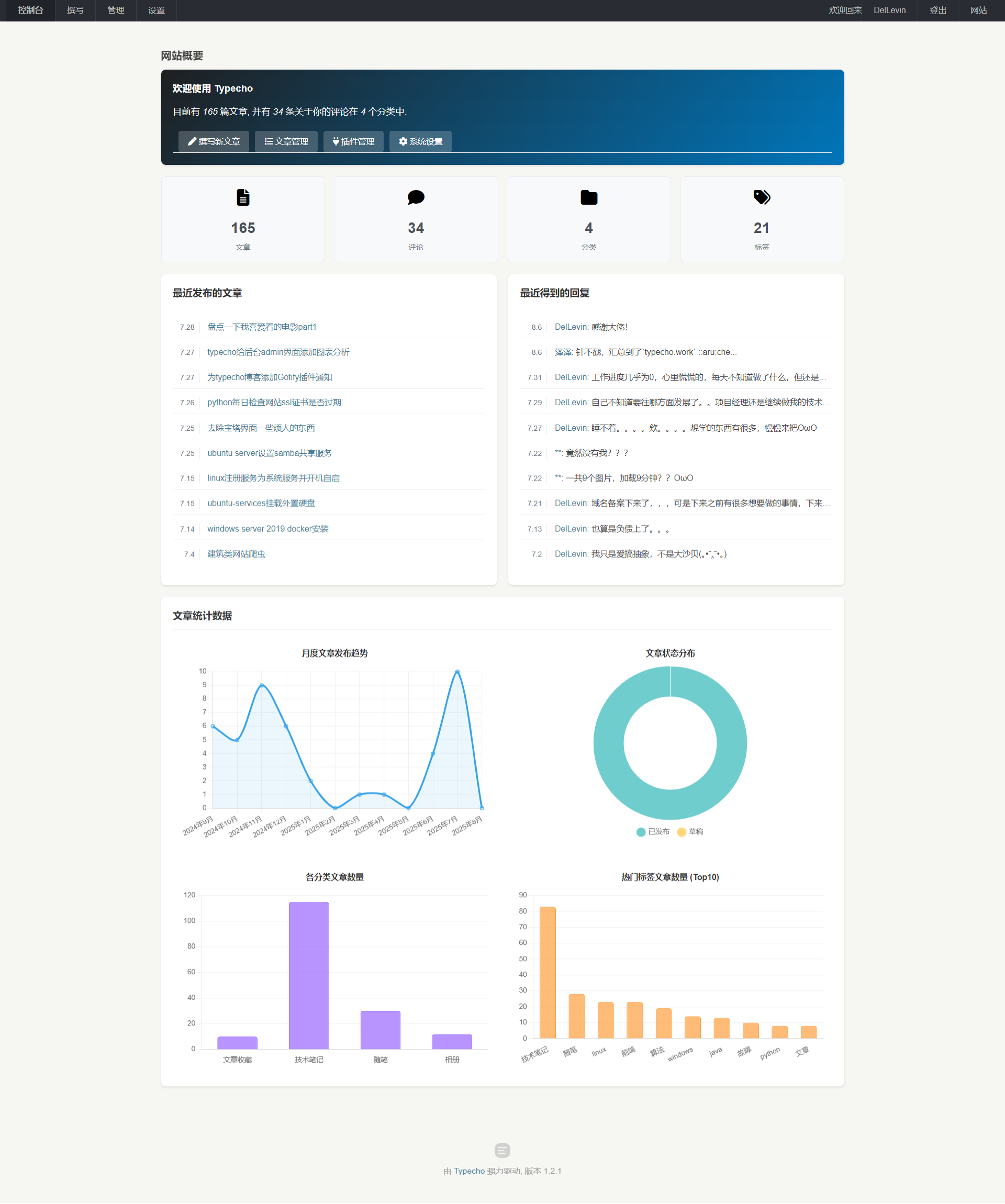
感兴趣的可以直接下载index.php文件覆盖/admin 下面的index.php文件
下载地址:
https://wonder1999.lanzouu.com/ikRiy32sfnah
<?php
include 'common.php';
include 'header.php';
include 'menu.php';
$stat = \Widget\Stat::alloc();
?>
<script src="https://blog.iletter.top/usr/blog_img/chart.js"></script>
<!-- 引入 Font Awesome 图标库 -->
<link rel="stylesheet" href="https://cdnjs.cloudflare.com/ajax/libs/font-awesome/6.5.0/css/all.min.css">
<style>
/* 自定义美化样式 */
.typecho-dashboard {
padding: 20px 0;
}
.card {
background-color: #fff;
border-radius: 8px;
box-shadow: 0 2px 4px rgba(0,0,0,0.1);
padding: 20px;
margin-bottom: 20px;
}
.card-title {
margin-top: 0;
margin-bottom: 15px;
padding-bottom: 10px;
border-bottom: 1px solid #eee;
color: #333;
font-size: 1.2em;
}
/* 欢迎区域 */
.welcome-card {
background: linear-gradient(135deg, #1f1f20 0%, #0076bb 100%);
color: white;
}
.welcome-card h3 {
color: white;
margin-top: 0;
}
.welcome-card p {
font-size: 1.1em;
margin-bottom: 20px;
}
.welcome-card a {
color: #fff;
text-decoration: underline;
}
.welcome-card a:hover {
text-decoration: none;
opacity: 0.9;
}
/* 快捷链接 */
#start-link {
list-style: none;
padding: 0;
margin: 0;
display: flex;
flex-wrap: wrap;
gap: 10px;
}
#start-link li {
margin: 0;
}
#start-link a {
display: inline-block;
padding: 8px 16px;
background-color: rgba(255, 255, 255, 0.2);
border-radius: 4px;
color: white !important;
text-decoration: none;
transition: background-color 0.3s ease;
}
#start-link a:hover {
background-color: rgba(255, 255, 255, 0.3);
}
#start-link .balloon {
background-color: #ff6b6b;
color: white;
border-radius: 10px;
padding: 2px 6px;
font-size: 0.8em;
margin-left: 5px;
}
/* 统计卡片 */
.stat-cards {
display: grid;
grid-template-columns: repeat(auto-fit, minmax(200px, 1fr));
gap: 15px;
margin-bottom: 20px;
}
.stat-card {
background-color: #f8f9fa;
border: 1px solid #e9ecef;
border-radius: 8px;
padding: 15px;
text-align: center;
transition: transform 0.2s ease, box-shadow 0.2s ease;
}
.stat-icon {
font-size: 2em;
margin-bottom: 10px;
color: #000000; /* 可根据不同类型调整颜色 */
}
.stat-number {
font-size: 1.8em;
font-weight: bold;
margin: 5px 0;
color: #495057;
}
.stat-label {
font-size: 0.9em;
color: #6c757d;
}
/* 最近列表 */
.latest-link ul {
list-style: none;
padding: 0;
margin: 0;
}
.latest-link li {
padding: 8px 0;
border-bottom: 1px solid #eee;
}
.latest-link li:last-child {
border-bottom: none;
}
.latest-link .title {
margin-left: 5px;
}
.latest-link span {
color: #6c757d;
font-size: 0.9em;
}
/* 图表区域 - 重新规划 */
.chart-container {
max-width: 1200px; /* 限制图表区域最大宽度 */
margin: 0 auto; /* 水平居中 */
display: flex;
flex-direction: column;
gap: 20px;
}
.chart-row {
display: flex;
gap: 20px;
flex-wrap: wrap;
}
.chart-box {
flex: 1;
min-width: 250px; /* 调整最小宽度以适应更多屏幕 */
background-color: #fff;
border-radius: 8px;
/*box-shadow: 0 2px 4px rgba(0,0,0,0.1);*/
padding: 15px;
display: flex;
flex-direction: column; /* 确保内部元素垂直排列 */
}
.chart-box h4 {
margin: 0 0 10px 0; /* 调整标题边距 */
text-align: center;
color: #333;
flex-shrink: 0; /* 防止标题被压缩 */
}
.chart-box canvas {
width: 100% !important; /* 确保画布宽度占满容器 */
max-height: 300px; /* 限制图表最大高度 */
flex-grow: 1; /* 画布占据剩余空间 */
}
/* 响应式调整 */
@media (max-width: 768px) {
.stat-cards {
grid-template-columns: repeat(2, 1fr);
}
.chart-row {
flex-direction: column; /* 小屏幕时堆叠 */
}
.chart-box {
min-width: 100%; /* 小屏幕时占满宽度 */
}
#start-link {
flex-direction: column;
}
}
/* 中等屏幕调整 - 让图表在中等屏幕也能两列显示 */
@media (min-width: 769px) and (max-width: 1100px) {
.chart-row {
/* 在这个范围内,允许换行,但.chart-box的flex行为会使其尽可能并排 */
}
.chart-box {
/* 可以微调 min-width 来控制换行点 */
min-width: calc(50% - 10px);
}
}
</style>
<div class="main">
<div class="container typecho-dashboard">
<?php include 'page-title.php'; ?>
<div class="row typecho-page-main">
<!-- 欢迎卡片 -->
<div class="col-mb-12" role="main">
<div class="card welcome-card">
<h3><?php _e('欢迎使用 Typecho'); ?></h3>
<p><?php _e('目前有 <em>%s</em> 篇文章, 并有 <em>%s</em> 条关于你的评论在 <em>%s</em> 个分类中.', $stat->myPublishedPostsNum, $stat->myPublishedCommentsNum, $stat->categoriesNum); ?></p>
<ul id="start-link" class="clearfix">
<?php if ($user->pass('contributor', true)): ?>
<li><a href="<?php $options->adminUrl('write-post.php'); ?>"><i class="fas fa-pen"></i> <?php _e('撰写新文章'); ?></a></li>
<?php if ($user->pass('editor', true) && 'on' == $request->get('__typecho_all_comments') && $stat->waitingCommentsNum > 0): ?>
<li>
<a href="<?php $options->adminUrl('manage-comments.php?status=waiting'); ?>"><i class="fas fa-comments"></i> <?php _e('待审核的评论'); ?></a>
<span class="balloon"><?php $stat->waitingCommentsNum(); ?></span>
</li>
<?php elseif ($stat->myWaitingCommentsNum > 0): ?>
<li>
<a href="<?php $options->adminUrl('manage-comments.php?status=waiting'); ?>"><i class="fas fa-comments"></i> <?php _e('待审核评论'); ?></a>
<span class="balloon"><?php $stat->myWaitingCommentsNum(); ?></span>
</li>
<?php endif; ?>
<?php if ($user->pass('editor', true) && 'on' == $request->get('__typecho_all_comments') && $stat->spamCommentsNum > 0): ?>
<li>
<a href="<?php $options->adminUrl('manage-comments.php?status=spam'); ?>"><i class="fas fa-trash-alt"></i> <?php _e('垃圾评论'); ?></a>
<span class="balloon"><?php $stat->spamCommentsNum(); ?></span>
</li>
<?php elseif ($stat->mySpamCommentsNum > 0): ?>
<li>
<a href="<?php $options->adminUrl('manage-comments.php?status=spam'); ?>"><i class="fas fa-trash-alt"></i> <?php _e('垃圾评论'); ?></a>
<span class="balloon"><?php $stat->mySpamCommentsNum(); ?></span>
</li>
<?php endif; ?>
<?php if ($user->pass('administrator', true)): ?>
<li><a href="<?php $options->adminUrl('manage-posts.php'); ?>"><i class="fas fa-list"></i> <?php _e('文章管理'); ?></a></li>
<li><a href="<?php $options->adminUrl('plugins.php'); ?>"><i class="fas fa-plug"></i> <?php _e('插件管理'); ?></a></li>
<li><a href="<?php $options->adminUrl('options-general.php'); ?>"><i class="fas fa-cog"></i> <?php _e('系统设置'); ?></a></li>
<?php endif; ?>
<?php endif; ?>
</ul>
</div>
</div>
<!-- 统计卡片 -->
<div class="col-mb-12">
<div class="stat-cards">
<div class="stat-card">
<a href="<?php $options->adminUrl('manage-posts.php'); ?>">
<div class="stat-icon"><i class="fas fa-file-alt"></i></div>
<div class="stat-number"><?php echo $stat->myPublishedPostsNum; ?></div>
<div class="stat-label"><?php _e('文章'); ?></div>
</a>
</div>
<div class="stat-card">
<a href="<?php $options->adminUrl('manage-comments.php'); ?>">
<div class="stat-icon"><i class="fas fa-comment"></i></div>
<div class="stat-number"><?php echo $stat->myPublishedCommentsNum; ?></div>
<div class="stat-label"><?php _e('评论'); ?></div>
</a>
</div>
<div class="stat-card">
<a href="<?php $options->adminUrl('manage-categories.php'); ?>">
<div class="stat-icon"><i class="fas fa-folder"></i></div>
<div class="stat-number"><?php echo $stat->categoriesNum; ?></div>
<div class="stat-label"><?php _e('分类'); ?></div>
</a>
</div>
<div class="stat-card">
<a href="<?php $options->adminUrl('manage-tags.php'); ?>">
<div class="stat-icon"><i class="fas fa-tags"></i></div>
<div class="stat-number"><?php echo $stat->tagsNum; ?></div>
<div class="stat-label"><?php _e('标签'); ?></div>
</a>
</div>
<!-- 可根据需要添加更多统计 -->
</div>
</div>
<!-- 左侧内容:最近文章 -->
<div class="col-mb-12 col-tb-6" role="complementary">
<div class="card">
<h3 class="card-title"><?php _e('最近发布的文章'); ?></h3>
<?php \Widget\Contents\Post\Recent::alloc('pageSize=10')->to($posts); ?>
<ul class="latest-link">
<?php if ($posts->have()): ?>
<?php while ($posts->next()): ?>
<li>
<span><?php $posts->date('n.j'); ?></span>
<a href="<?php $posts->permalink(); ?>" class="title"><?php $posts->title(); ?></a>
</li>
<?php endwhile; ?>
<?php else: ?>
<li><em><?php _e('暂时没有文章'); ?></em></li>
<?php endif; ?>
</ul>
</div>
</div>
<!-- 右侧内容:最近评论 -->
<div class="col-mb-12 col-tb-6" role="complementary">
<div class="card">
<h3 class="card-title"><?php _e('最近得到的回复'); ?></h3>
<ul class="latest-link">
<?php \Widget\Comments\Recent::alloc('pageSize=10')->to($comments); ?>
<?php if ($comments->have()): ?>
<?php while ($comments->next()): ?>
<li>
<span><?php $comments->date('n.j'); ?></span>
<a href="<?php $comments->permalink(); ?>" class="title"><?php $comments->author(false); ?></a>:
<?php $comments->excerpt(35, '...'); ?>
</li>
<?php endwhile; ?>
<?php else: ?>
<li><?php _e('暂时没有回复'); ?></li>
<?php endif; ?>
</ul>
</div>
</div>
<!-- 图表显示区域 -->
<div class="col-mb-12" role="complementary">
<div class="card">
<h3 class="card-title" style="color: #333;"><?php _e('文章统计数据'); ?></h3>
<div class="chart-container">
<div class="chart-row">
<!-- 月度发布图表 -->
<div class="chart-box">
<h4><?php _e('月度文章发布趋势'); ?></h4>
<canvas id="monthlyPostChart" height="250"></canvas>
</div>
<!-- 状态分布图表 -->
<div class="chart-box">
<h4><?php _e('文章状态分布'); ?></h4>
<canvas id="statusChart" height="250"></canvas>
</div>
</div>
<div class="chart-row">
<!-- 分类文章统计 -->
<div class="chart-box">
<h4><?php _e('各分类文章数量'); ?></h4>
<canvas id="categoryChart" height="250"></canvas>
</div>
<!-- 标签文章统计 -->
<div class="chart-box">
<h4><?php _e('热门标签文章数量 (Top10)'); ?></h4>
<canvas id="tagChart" height="250"></canvas>
</div>
</div>
</div>
</div>
</div>
</div>
</div>
</div>
<?php
include 'copyright.php';
include 'common-js.php';
?>
<script>
$(document).ready(function() {
<?php
// ==================== PHP 数据计算部分 ====================
// 1. 月度文章统计数据
$db = Typecho_Db::get();
// 月度文章统计
$select = $db->select()
->from('table.contents')
->where('type = ?', 'post')
->where('status = ?', 'publish');
$posts = $db->fetchAll($select);
$monthlyData = [];
$monthLabels = [];
$currentYear = date('Y');
$currentMonth = date('n');
// 初始化最近12个月的数据
for ($i = 11; $i >= 0; $i--) {
$year = $currentYear;
$month = $currentMonth - $i;
if ($month <= 0) {
$month += 12;
$year--;
}
$key = $year . '-' . str_pad($month, 2, '0', STR_PAD_LEFT);
$monthlyData[$key] = 0;
$monthLabels[$key] = $year . '年' . $month . '月';
}
// 统计实际数据
foreach ($posts as $post) {
$created = $post['created'];
$year = date('Y', $created);
$month = date('m', $created);
$key = $year . '-' . $month;
if (isset($monthlyData[$key])) {
$monthlyData[$key]++;
}
}
// 2. 文章状态统计
$published = $db->fetchObject($db->select(['COUNT(*)' => 'count'])
->from('table.contents')
->where('type = ?', 'post')
->where('status = ?', 'publish'))->count;
$draft = $db->fetchObject($db->select(['COUNT(*)' => 'count'])
->from('table.contents')
->where('type = ?', 'post_draft') // 注意:Typecho 草稿通常在 contents 表中 type 为 post_draft
// ->where('status = ?', 'publish') // 草稿状态通常不是 publish,可以省略或检查实际结构
)->count;
// 3. 分类文章统计
$categories = $db->fetchAll($db->select()->from('table.metas')->where('type = ?', 'category'));
$categoryData = [];
$categoryLabels = [];
foreach ($categories as $category) {
$count = $db->fetchObject($db->select(['COUNT(*)' => 'count'])
->from('table.relationships')
->where('mid = ?', $category['mid']))->count;
if ($count > 0) { // 只显示有文章的分类
$categoryLabels[] = $category['name'];
$categoryData[] = (int)$count;
}
}
// 4. 标签文章统计 (取前10个)
$tags = $db->fetchAll($db->select()->from('table.metas')->where('type = ?', 'tag'));
$tagData = [];
$tagLabels = [];
foreach ($tags as $tag) {
$count = $db->fetchObject($db->select(['COUNT(*)' => 'count'])
->from('table.relationships')
->where('mid = ?', $tag['mid']))->count;
if ($count > 0) {
$tagLabels[] = $tag['name'];
$tagData[] = (int)$count;
}
}
// 按数量排序,取前10个
array_multisort($tagData, SORT_DESC, $tagLabels);
$topTagLabels = array_slice($tagLabels, 0, 10);
$topTagData = array_slice($tagData, 0, 10);
// 准备图表数据
$chartMonthlyData = [
'labels' => array_values($monthLabels),
'values' => array_values($monthlyData)
];
$chartStatusData = [
'published' => (int)$published,
'draft' => (int)$draft
];
$chartCategoryData = [
'labels' => $categoryLabels,
'values' => $categoryData
];
$chartTagData = [
'labels' => $topTagLabels,
'values' => $topTagData
];
?>
// ==================== JavaScript 图表渲染部分 ====================
// 1. 月度文章图表
var monthlyData = <?php echo json_encode($chartMonthlyData); ?>;
if (monthlyData.labels && monthlyData.labels.length > 0) {
var ctx1 = document.getElementById('monthlyPostChart').getContext('2d');
new Chart(ctx1, {
type: 'line',
data: {
labels: monthlyData.labels,
datasets: [{
label: '每月发文数',
data: monthlyData.values,
borderColor: 'rgb(54, 162, 235)', // 调整为蓝色系
backgroundColor: 'rgba(54, 162, 235, 0.1)',
tension: 0.3, // 稍微增加曲线张力
fill: true
}]
},
options: {
responsive: true,
maintainAspectRatio: false,
scales: {
y: {
beginAtZero: true,
ticks: {
precision: 0
},
grid: {
color: 'rgba(0, 0, 0, 0.05)' // 网格线颜色
}
},
x: {
grid: {
color: 'rgba(0, 0, 0, 0.05)'
}
}
},
plugins: {
legend: {
display: false // 隐藏图例,因为只有一个数据集
},
tooltip: {
mode: 'index',
intersect: false
}
}
}
});
}
// 2. 文章状态图表
var statusData = <?php echo json_encode($chartStatusData); ?>;
if (statusData) {
var ctx2 = document.getElementById('statusChart').getContext('2d');
new Chart(ctx2, {
type: 'doughnut',
data: {
labels: ['已发布', '草稿'],
datasets: [{
data: [statusData.published, statusData.draft],
backgroundColor: [
'rgba(75, 192, 192, 0.8)', // 已发布 - 青色
'rgba(255, 205, 86, 0.8)', // 草稿 - 黄色
],
borderWidth: 1,
borderColor: '#fff'
}]
},
options: {
responsive: true,
maintainAspectRatio: false,
plugins: {
legend: {
position: 'bottom',
labels: {
padding: 15,
usePointStyle: true
}
},
tooltip: {
callbacks: {
label: function(context) {
return context.label + ': ' + context.raw;
}
}
}
},
cutout: '60%' // 增加中间空心部分
}
});
}
// 3. 分类文章图表
var categoryData = <?php echo json_encode($chartCategoryData); ?>;
if (categoryData.labels && categoryData.labels.length > 0) {
var ctx3 = document.getElementById('categoryChart').getContext('2d');
new Chart(ctx3, {
type: 'bar',
data: {
labels: categoryData.labels,
datasets: [{
label: '文章数量',
data: categoryData.values,
backgroundColor: 'rgba(153, 102, 255, 0.7)', // 紫色系
borderColor: 'rgba(153, 102, 255, 1)',
borderWidth: 1,
borderRadius: 4, // 条形圆角
barPercentage: 0.7, // 调整条形宽度
categoryPercentage: 0.8
}]
},
options: {
indexAxis: 'x', // 保持为垂直柱状图
responsive: true,
maintainAspectRatio: false,
scales: {
y: {
beginAtZero: true,
ticks: {
precision: 0
},
grid: {
color: 'rgba(0, 0, 0, 0.05)'
}
},
x: {
grid: {
display: false // 隐藏 X 轴网格线
}
}
},
plugins: {
legend: {
display: false
},
tooltip: {
mode: 'index',
intersect: false
}
}
}
});
}
// 4. 标签文章图表
var tagData = <?php echo json_encode($chartTagData); ?>;
if (tagData.labels && tagData.labels.length > 0) {
var ctx4 = document.getElementById('tagChart').getContext('2d');
new Chart(ctx4, {
type: 'bar',
data: {
labels: tagData.labels,
datasets: [{
label: '文章数量',
data: tagData.values,
backgroundColor: 'rgba(255, 159, 64, 0.7)', // 橙色系
borderColor: 'rgba(255, 159, 64, 1)',
borderWidth: 1,
borderRadius: 4,
barPercentage: 0.7,
categoryPercentage: 0.8
}]
},
options: {
indexAxis: 'x',
responsive: true,
maintainAspectRatio: false,
scales: {
y: {
beginAtZero: true,
ticks: {
precision: 0
},
grid: {
color: 'rgba(0, 0, 0, 0.05)'
}
},
x: {
grid: {
display: false
}
}
},
plugins: {
legend: {
display: false
},
tooltip: {
mode: 'index',
intersect: false
}
}
}
});
}
});
</script>
<script>
$(document).ready(function () {
});
</script>
<?php include 'footer.php'; ?>
其他插件推荐: