file-upload.php和file-upload-js.php。修改之前记得备份文件。更改了一下排序顺序,刚上传的放在最前面。如果是图片就可以简单预览缩略图。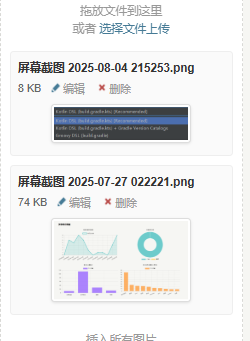
更改file-upload.php
<?php if(!defined('__TYPECHO_ADMIN__')) exit; ?>

<?php
if (isset($post) || isset($page)) {
    $cid = isset($post) ? $post->cid : $page->cid;

    if ($cid) {
        \Widget\Contents\Attachment\Related::alloc(['parentId' => $cid])->to($attachment);
    } else {
        \Widget\Contents\Attachment\Unattached::alloc()->to($attachment);
    }
}
?>

<div id="upload-panel" class="p">
    <div class="upload-area" draggable="true"><?php _e('拖放文件到这里<br>或者 %s选择文件上传%s', '<a href="###" class="upload-file">', '</a>'); ?></div>
    <ul id="file-list">
    <?php while ($attachment->next()): ?>
        <li data-cid="<?php $attachment->cid(); ?>" data-url="<?php echo $attachment->attachment->url; ?>" data-image="<?php echo $attachment->attachment->isImage ? 1 : 0; ?>">
            <input type="hidden" name="attachment[]" value="<?php $attachment->cid(); ?>" />
            <a class="insert" title="<?php _e('点击插入文件'); ?>" href="###"><?php $attachment->title(); ?></a>
            <div class="info">
                <?php echo number_format(ceil($attachment->attachment->size / 1024)); ?> Kb
                <a class="file" target="_blank" href="<?php $options->adminUrl('media.php?cid=' . $attachment->cid); ?>" title="<?php _e('编辑'); ?>"><i class="i-edit"></i>编辑</a>
                <a href="###" class="delete" title="<?php _e('删除'); ?>"><i class="i-delete"></i>删除</a>
            </div>
            <?php if ($attachment->attachment->isImage): ?>
                <div class="image-preview">
                    <img src="<?php echo $attachment->attachment->url; ?>" alt="<?php $attachment->title(); ?>" />
                </div>
            <?php endif; ?>
        </li>
    <?php endwhile; ?>
    </ul>
</div>

<style>
/* 为包含图片的列表项设置基础样式 */
#file-list li {
    margin-bottom: 10px; /* 列表项之间的间距 */
    padding: 8px; /* 内边距 */
    border: 1px solid #eee; /* 边框 */
    border-radius: 4px; /* 圆角 */
    background-color: #fafafa; /* 背景色 */
    list-style: none; /* 去除默认列表符号 */
}

/* 标题样式 */
#file-list li .insert {
    display: block; /* 使其独占一行 */
    font-weight: bold; /* 标题加粗 */
    margin-bottom: 4px; /* 与下方 .info 的间距 */
    color: #333; /* 标题颜色 */
    text-decoration: none; /* 去除下划线 */
}

#file-list li .insert:hover {
    text-decoration: underline; /* 悬停时添加下划线 */
}

/* 信息栏样式 */
#file-list li .info {
    font-size: 0.9em; /* 信息栏字体稍小 */
    color: #666; /* 信息栏颜色 */
    margin-bottom: 8px; /* 与下方图片的间距 */
    line-height: 1.4; /* 行高 */
}

/* 信息栏内的链接和图标 */
#file-list li .info a {
    margin-right: 8px; /* 链接之间的间距 */
    color: #999; /* 图标颜色 */
    text-decoration: none;
}

#file-list li .info a:hover {
    color: #007cba; /* 悬停时的颜色 */
}

/* 图片预览容器 */
.image-preview {
    text-align: center; /* 图片居中 */
    margin-top: 5px; /* 与上方 .info 的间距 */
    clear: both; /* 清除浮动(如果有的话) */
}

/* 图片样式 */
.image-preview img {
    max-width: 150px; /* 设置最大宽度 */
    max-height: 150px; /* 设置最大高度 */
    height: auto; /* 保持宽高比 */
    border: 1px solid #ddd; /* 图片边框 */
    border-radius: 4px; /* 图片圆角 */
    padding: 2px; /* 图片内边距 */
    background-color: #fff; /* 图片背景色,防止透明图有背景色干扰 */
    box-shadow: 0 1px 3px rgba(0,0,0,0.1); /* 添加轻微阴影 */
}

/* 加载状态样式 */
#file-list li.loading {
    color: #999;
    font-style: italic;
}

/* 删除按钮悬停效果 */
#file-list li a.delete:hover {
    color: #e74c3c !important; /* 删除按钮悬停时变为红色 */
}

/* 编辑按钮悬停效果 */
#file-list li a.file:hover {
    color: #3498db !important; /* 编辑按钮悬停时变为蓝色 */
}
</style>
更改file-upload-js.php
<?php if(!defined('__TYPECHO_ADMIN__')) exit; ?>
<?php
if (isset($post) && $post instanceof \Typecho\Widget && $post->have()) {
    $fileParentContent = $post;
} elseif (isset($page) && $page instanceof \Typecho\Widget && $page->have()) {
    $fileParentContent = $page;
}

$phpMaxFilesize = function_exists('ini_get') ? trim(ini_get('upload_max_filesize')) : 0;

if (preg_match("/^([0-9]+)([a-z]{1,2})$/i", $phpMaxFilesize, $matches)) {
    $phpMaxFilesize = strtolower($matches[1] . $matches[2] . (1 == strlen($matches[2]) ? 'b' : ''));
}
?>

<script src="<?php $options->adminStaticUrl('js', 'moxie.js'); ?>"></script>
<script src="<?php $options->adminStaticUrl('js', 'plupload.js'); ?>"></script>
<script>
$(document).ready(function() {
    function updateAttacmentNumber () {
        var btn = $('#tab-files-btn'),
            balloon = $('.balloon', btn),
            count = $('#file-list li .insert').length;

        if (count > 0) {
            if (!balloon.length) {
                btn.html($.trim(btn.html()) + ' ');
                balloon = $('<span class="balloon"></span>').appendTo(btn);
            }

            balloon.html(count);
        } else if (0 == count && balloon.length > 0) {
            balloon.remove();
        }
    }

    $('.upload-area').bind({
        dragenter   :   function () {
            $(this).parent().addClass('drag');
        },

        dragover    :   function (e) {
            $(this).parent().addClass('drag');
        },

        drop        :   function () {
            $(this).parent().removeClass('drag');
        },

        dragend     :   function () {
            $(this).parent().removeClass('drag');
        },

        dragleave   :   function () {
            $(this).parent().removeClass('drag');
        }
    });

    updateAttacmentNumber();

    function fileUploadStart (file) {
        $('<li id="' + file.id + '" class="loading">'
            + file.name + '</li>').appendTo('#file-list');
    }

    function fileUploadError (error) {
        var file = error.file, code = error.code, word;

        switch (code) {
            case plupload.FILE_SIZE_ERROR:
                word = '<?php _e('文件大小超过限制'); ?>';
                break;
            case plupload.FILE_EXTENSION_ERROR:
                word = '<?php _e('文件扩展名不被支持'); ?>';
                break;
            case plupload.FILE_DUPLICATE_ERROR:
                word = '<?php _e('文件已经上传过'); ?>';
                break;
            case plupload.HTTP_ERROR:
            default:
                word = '<?php _e('上传出现错误'); ?>';
                break;
        }

        var fileError = '<?php _e('%s 上传失败'); ?>'.replace('%s', file.name),
            li, exist = $('#' + file.id);

        if (exist.length > 0) {
            li = exist.removeClass('loading').html(fileError);
        } else {
            li = $('<li>' + fileError + '<br />' + word + '</li>').appendTo('#file-list');
        }

        li.effect('highlight', {color : '#FBC2C4'}, 2000, function () {
            $(this).remove();
        });

        // fix issue #341
        this.removeFile(file);
    }

    var completeFile = null;
    function fileUploadComplete (id, url, data) {
        // 根据是否为图片来构建列表项内容
        var itemContent = '<input type="hidden" name="attachment[]" value="' + data.cid + '" />';

        // 添加标题和信息
        itemContent += '<a class="insert" target="_blank" href="###" title="<?php _e('点击插入文件'); ?>">' + data.title + '</a>'
                     + '<div class="info">' + data.bytes
                     + ' <a class="file" target="_blank" href="<?php $options->adminUrl('media.php'); ?>?cid='
                     + data.cid + '" title="<?php _e('编辑'); ?>"><i class="i-edit"></i>编辑</a>'
                     + ' <a class="delete" href="###" title="<?php _e('删除'); ?>"><i class="i-delete"></i>删除</a></div>';

        // 如果是图片,添加预览图 (注意:这里图片放在 .info 之后,与PHP模板保持一致)
        if (data.isImage) {
            itemContent += '<div class="image-preview"><img src="' + data.url + '" alt="' + data.title + '" /></div>';
        }

        // 创建 jQuery 对象 li
        var li = $('#' + id).removeClass('loading').data('cid', data.cid)
            .data('url', data.url)
            .data('image', data.isImage)
            .html(itemContent); // 先设置内容

        // 关键修改:将新 li 插入到 #file-list 的最前面,而不是留在原地或追加到末尾
        // 1. 先从当前位置移除(如果它在列表中的话,虽然通常在上传开始时是添加到列表末尾的空li)
        // 2. 然后插入到 #file-list 的开头
        li.prependTo('#file-list'); // prependTo 将元素插入到目标元素的开头

        // 绑定事件
        attachInsertEvent(li);
        attachDeleteEvent(li);
        updateAttacmentNumber();

        if (!completeFile) {
            completeFile = data;
        }
    }

    var uploader = null, tabFilesEl = $('#tab-files').bind('init', function () {
        uploader = new plupload.Uploader({
            browse_button   :   $('.upload-file').get(0),
            url             :   '<?php $security->index('/action/upload'
                . (isset($fileParentContent) ? '?cid=' . $fileParentContent->cid : '')); ?>',
            runtimes        :   'html5,flash,html4',
            flash_swf_url   :   '<?php $options->adminStaticUrl('js', 'Moxie.swf'); ?>',
            drop_element    :   $('.upload-area').get(0),
            filters         :   {
                max_file_size       :   '<?php echo $phpMaxFilesize ?>',
                mime_types          :   [{'title' : '<?php _e('允许上传的文件'); ?>', 'extensions' : '<?php echo implode(',', $options->allowedAttachmentTypes); ?>'}],
                prevent_duplicates  :   true
            },

            init            :   {
                FilesAdded      :   function (up, files) {
                    for (var i = 0; i < files.length; i ++) {
                        fileUploadStart(files[i]);
                    }

                    completeFile = null;
                    uploader.start();
                },

                UploadComplete  :   function () {
                    if (completeFile) {
                        Typecho.uploadComplete(completeFile);
                    }
                },

                FileUploaded    :   function (up, file, result) {
                    if (200 == result.status) {
                        var data = $.parseJSON(result.response);

                        if (data) {
                            fileUploadComplete(file.id, data[0], data[1]);
                            uploader.removeFile(file);
                            return;
                        }
                    }

                    fileUploadError.call(uploader, {
                        code : plupload.HTTP_ERROR,
                        file : file
                    });
                },

                Error           :   function (up, error) {
                    fileUploadError.call(uploader, error);
                }
            }
        });

        uploader.init();
    });

    Typecho.uploadFile = function (file, name) {
        if (!uploader) {
            $('#tab-files-btn').parent().trigger('click');
        }

        var timer = setInterval(function () {
            if (!uploader) {
                return;
            }

            clearInterval(timer);
            timer = null;

            uploader.addFile(file, name);
        }, 50);
    };

    // function attachInsertEvent (el) {
    //     $('.insert', el).click(function () {
    //         var t = $(this), p = t.parents('li');
    //         Typecho.insertFileToEditor(t.text(), p.data('url'), p.data('image'));
    //         return false;
    //     });
    // }
    // 修改 attachInsertEvent 函数,使其能处理标题链接和图片
    function attachInsertEvent (el) {
        // 为标题链接和图片(或其父容器 .image-preview)绑定点击事件
        $('.insert, .image-preview img', el).click(function (e) {
            // 防止事件冒泡到父级 <a> 标签(如果图片被另一个链接包裹的话)
            e.stopPropagation();

            var t = $(this);
            // 查找当前点击元素的父级 <li>,然后从中获取数据
            var p = t.closest('li'); // 使用 closest 更可靠,可以找到最近的祖先 <li>

            // 确保找到了包含数据的 <li> 元素
            if (p.length > 0) {
                // 从 <li> 元素获取数据
                var url = p.data('url');
                var isImage = p.data('image');
                var title = p.find('.insert').first().text(); // 获取标题文本

                // 调用 Typecho 提供的插入函数
                Typecho.insertFileToEditor(title, url, isImage);
            }

            return false; // 阻止默认链接行为
        });
    }

    function attachDeleteEvent (el) {
        var file = $('a.insert', el).text();
        $('.delete', el).click(function () {
            if (confirm('<?php _e('确认要删除文件 %s 吗?'); ?>'.replace('%s', file))) {
                var cid = $(this).parents('li').data('cid');
                $.post('<?php $security->index('/action/contents-attachment-edit'); ?>',
                    {'do' : 'delete', 'cid' : cid},
                    function () {
                        $(el).fadeOut(function () {
                            $(this).remove();
                            updateAttacmentNumber();
                        });
                    });
            }

            return false;
        });
    }

    $('#file-list li').each(function () {
        attachInsertEvent(this);
        attachDeleteEvent(this);
    });
});
</script>
但是我不是vip用户,宝塔面板也是关闭一些权限,剩下的哪些vip功能还是收费,看着碍眼,索性去照代码里面删掉该部分即可。
本教程只适用于宝塔面板v11.0.0。其他版本还需要自行测试。
关闭不必要的功能
设置->常用设置->面板栏隐藏,隐藏如下功能
WAF、WP Tools、多用户、邮局、节点管理
去除首页的软件推荐功能。
一开始我本以为这个是在utils-lib.js里面带着的,后来通过减慢请求查看到是在请求里面带着的。通过搜索关键词get_pay_type发现,是通过getRecommendContent这个请求函数带过来的。所以我们需要在这里设置返还值为空即将getRecommendContent=()=>useAxios.post("ajax/get_pay_type")
替换成getRecommendContent=()=>{return []}
去除其他界面的vip功能
utils-lib.js去掉如下内容
去除SSH登录日志
{path:"ssh",name:"ssh",meta:{title:"SSH登录日志"},component:()=>__vitePreload((()=>import("./index52.js?v=1754557180")),__vite__mapDeps([]),import.meta.url)},去除自动部署
,{path:"auto-deploy",name:"auto-deploy",meta:{title:"自动部署"},component:()=>__vitePreload((()=>import("./index84.js?v=1754557180").then((e=>e.i))),__vite__mapDeps([]),import.meta.url)}去除面板日报
,{path:"daily",name:"daily",meta:{title:"面板日报"},component:()=>__vitePreload((()=>import("./index12.js?v=1754557180")),__vite__mapDeps([]),import.meta.url)}去除安全检测等其他功能
,{path:"safe-detect",name:"safe-detect",meta:{title:"安全检测"},component:()=>__vitePreload((()=>import("./index41.js?v=1754557180")),__vite__mapDeps([]),import.meta.url)},{path:"keyword",name:"keyword",meta:{title:"违规词检测"},component:()=>__vitePreload((()=>import("./index42.js?v=1754557180")),__vite__mapDeps([]),import.meta.url)},{path:"php-safe",name:"php-safe",meta:{title:"PHP网站安全"},component:()=>__vitePreload((()=>import("./index43.js?v=1754557180")),__vite__mapDeps([]),import.meta.url)},{path:"intrusion",name:"intrusion",meta:{title:"入侵防御"},component:()=>__vitePreload((()=>import("./index44.js?v=1754557180")),__vite__mapDeps([]),import.meta.url)},{path:"fixed",name:"fixed",meta:{title:"系统加固"},component:()=>__vitePreload((()=>import("./index45.js?v=1754557180")),__vite__mapDeps([]),import.meta.url)},{path:"network-scan",name:"network-scan",meta:{title:"扫描感知"},component:()=>__vitePreload((()=>import("./index46.js?v=1754557180")),__vite__mapDeps([]),import.meta.url)}
直接将该代码替换掉原本的代码即可:
<?php

namespace TypechoPlugin\HelloWorld;

use Typecho\Plugin\PluginInterface;
use Typecho\Widget\Helper\Form;
use Typecho\Widget\Helper\Form\Element\Text;
use Widget\Options;
use Widget\Stat;
use Typecho\Db;

if (!defined('__TYPECHO_ROOT_DIR__')) {
    exit;
}

/**
 * Hello World
 *
 * @package HelloWorld
 * @author 白荼
 * @version 1.0.0
 */
class Plugin implements PluginInterface
{
    /**
     * 激活插件方法,如果激活失败,直接抛出异常
     */
    public static function activate()
    {
        \Typecho\Plugin::factory('admin/menu.php')->navBar = __CLASS__ . '::render';
        // 添加CSS和JS
        \Typecho\Plugin::factory('admin/header.php')->header = __CLASS__ . '::header';
    }

    /**
     * 禁用插件方法,如果禁用失败,直接抛出异常
     */
    public static function deactivate()
    {
    }

    /**
     * 获取插件配置面板
     *
     * @param Form $form 配置面板
     */
    public static function config(Form $form)
    {
        /** 分类名称 */
        $name = new Text('word', null, 'Hello World', _t('说点什么'));
        $form->addInput($name);
    }

    /**
     * 个人用户的配置面板
     *
     * @param Form $form
     */
    public static function personalConfig(Form $form)
    {
    }

    /**
     * 在header中添加CSS和JS
     */
    public static function header($header)
    {
        $customCssJs = '
<!-- HelloWorld Plugin CSS -->
<style>
.helloworld-tooltip {
    position: absolute;
    background: #fff;
    border: 1px solid #ddd;
    border-radius: 4px;
    padding: 15px;
    box-shadow: 0 2px 8px rgba(0,0,0,0.15);
    z-index: 9999;
    min-width: 280px;
    display: none;
    font-size: 12px;
}
.helloworld-tooltip h4 {
    margin: 0 0 10px 0;
    padding: 0;
    color: #333;
    border-bottom: 1px solid #eee;
    padding-bottom: 8px;
    font-size: 14px;
}
.helloworld-tooltip .comparison {
    background: #f8f9fa;
    border-left: 3px solid #007cba;
    padding: 8px 12px;
    margin: 10px 0;
    border-radius: 0 4px 4px 0;
    font-size: 13px;
}
.helloworld-tooltip ul {
    list-style: none;
    padding: 0;
    margin: 0;
}
.helloworld-tooltip li {
    padding: 5px 0;
    border-bottom: 1px solid #f5f5f5;
    line-height: 1.5;
}
.helloworld-tooltip li:last-child {
    border-bottom: none;
}
.helloworld-tooltip strong {
    color: #666;
    font-weight: normal;
}
.helloworld-trigger {
    cursor: pointer;
    border-bottom: 1px dotted #BBBBBB;
}
.helloworld-trigger:hover {
    color: #666 !important;
    border-bottom-color: #666;
}
</style>
<!-- HelloWorld Plugin JS -->
<script>
(function() {
    function initHelloWorldTooltip() {
        var trigger = document.querySelector(".helloworld-trigger");
        var tooltip = document.querySelector(".helloworld-tooltip");

        if (trigger && tooltip) {
            trigger.addEventListener("click", function(e) {
                e.preventDefault();
                e.stopPropagation();

                // 计算位置
                var rect = trigger.getBoundingClientRect();
                var tooltipWidth = tooltip.offsetWidth || 280;
                var tooltipHeight = tooltip.offsetHeight || 250;

                // 默认位置
                var left = rect.left + window.scrollX;
                var top = rect.bottom + window.scrollY + 5;

                // 边界检测
                if (left + tooltipWidth > window.innerWidth + window.scrollX) {
                    left = window.innerWidth + window.scrollX - tooltipWidth - 10;
                }
                if (top + tooltipHeight > window.innerHeight + window.scrollY) {
                    top = rect.top + window.scrollY - tooltipHeight - 5;
                }

                tooltip.style.left = left + "px";
                tooltip.style.top = top + "px";
                tooltip.style.display = "block";
            });

            // 点击其他地方关闭
            document.addEventListener("click", function(e) {
                if (!tooltip.contains(e.target) && e.target !== trigger) {
                    tooltip.style.display = "none";
                }
            });
        }
    }

    if (document.readyState === "loading") {
        document.addEventListener("DOMContentLoaded", initHelloWorldTooltip);
    } else {
        initHelloWorldTooltip();
    }
})();
</script>';

        return $header . $customCssJs;
    }

    /**
     * 根据字数获取对应的文学著作比较
     */
    private static function getLiteraryComparison($wordCount)
    {
        // 文学著作字数对照表(字数 => 著作名称)
        $literaryWorks = [
            // 百字级
            50 => '几行诗句',
            100 => '一段朋友圈文字',
            200 => '一条微博内容',
            500 => '一篇微博长文',

            // 千字级
            1000 => '一页A4纸手写内容',
            1500 => '一页打印稿',
            2000 => '一篇标准作文',
            3000 => '一篇博客文章',
            5000 => '一篇短篇小说',
            8000 => '一篇中篇小说开头',

            // 万字级(中国现代文学)
            10000 => '《呐喊》',
            12000 => '《彷徨》',
            15000 => '《朝花夕拾》',
            20000 => '《野草》',
            25000 => '《故事新编》',
            30000 => '《热风》',
            35000 => '《坟》',
            40000 => '《而已集》',
            45000 => '《三闲集》',

            // 万字级(其他现代文学)
            50000 => '《沉沦》(郁达夫)',
            55000 => '《春风沉醉的晚上》',
            60000 => '《迟桂花》',
            65000 => '《茑萝集》',
            70000 => '《过去》',
            75000 => '《薄奠》',
            80000 => '《微雪的早晨》',

            // 万字级(长篇小说选段)
            85000 => '《骆驼祥子》前半部分',
            90000 => '《二马》',
            95000 => '《离婚》',
            100000 => '《骆驼祥子》',
            110000 => '《四世同堂》第一部分',
            120000 => '《边城》',
            130000 => '《湘行散记》',
            140000 => '《长河》',
            150000 => '《家》',
            160000 => '《憩园》',
            170000 => '《第四病室》',
            180000 => '《春》',
            190000 => '《秋》',
            200000 => '《寒夜》',

            // 20万字级
            210000 => '《激流三部曲》选段',
            220000 => '《爱情三部曲》选段',
            230000 => '《抗战三部曲》选段',
            240000 => '《人间词话》',
            250000 => '《人间喜剧》选段',
            260000 => '《巴黎圣母院》',
            270000 => '《悲惨世界》选段',
            280000 => '《九三年》',
            290000 => '《海上劳工》',
            300000 => '《笑面人》',

            // 30万字级
            310000 => '《约翰·克利斯朵夫》选段',
            320000 => '《红与黑》',
            330000 => '《巴马修道院》',
            340000 => '《吕西安·娄凡》',
            350000 => '《阿尔芒斯》',
            360000 => '《法尼娜·法尼尼》',
            370000 => '《瓦尼娜·瓦尼尼》',
            380000 => '《红屋骑士》',
            390000 => '《卡斯特罗修道院院长》',
            400000 => '《意大利遗事》',

            // 40万字级
            410000 => '《三个火枪手》',
            420000 => '《基督山伯爵》',
            430000 => '《黑郁金香》',
            440000 => '《二十年后》',
            450000 => '《布拉热洛纳子爵》',
            460000 => '《玛戈王后》',
            470000 => '《蒙梭罗夫人》',
            480000 => '《四十五卫士》',
            490000 => '《侠隐记》',
            500000 => '《红楼梦》(精简版)',

            // 50万字级
            520000 => '《水浒传》选段',
            540000 => '《西游记》选段',
            560000 => '《三国演义》选段',
            580000 => '《儒林外史》',
            600000 => '《聊斋志异》选段',
            620000 => '《阅微草堂笔记》',
            640000 => '《子不语》',
            660000 => '《夜雨秋灯录》',
            680000 => '《萤窗异草》',
            700000 => '《耳食录》',

            // 70万字级
            720000 => '《浮生六记》',
            740000 => '《影梅庵忆语》',
            760000 => '《秋灯琐忆》',
            780000 => '《香艳丛书》选段',
            800000 => '《太平广记》选段',
            820000 => '《夷坚志》选段',
            840000 => '《剪灯新话》',
            860000 => '《剪灯余话》',
            880000 => '《觅灯因话》',
            900000 => '《喻世明言》',

            // 百万字级
            920000 => '《警世通言》',
            940000 => '《醒世恒言》',
            960000 => '《初刻拍案惊奇》',
            980000 => '《二刻拍案惊奇》',
            1000000 => '《红楼梦》',
            1050000 => '《镜花缘》',
            1100000 => '《老残游记》',
            1150000 => '《孽海花》',
            1200000 => '《官场现形记》',
            1250000 => '《二十年目睹之怪现状》',

            // 百万字级以上
            1300000 => '《资本论》第一卷',
            1400000 => '《莎士比亚十四行诗集》',
            1500000 => '《战争与和平》',
            1600000 => '《安娜·卡列尼娜》',
            1700000 => '《复活》',
            1800000 => '《静静的顿河》',
            1900000 => '《被开垦的处女地》',
            2000000 => '《一个人的遭遇》',
            2100000 => '《静静的顿河》全本',
            2200000 => '《钢铁是怎样炼成的》',
            2300000 => '《青年近卫军》',
            2400000 => '《日瓦戈医生》',
            2500000 => '《追忆似水年华》第一卷',
            2600000 => '《约翰·克利斯朵夫》',
            2700000 => '《马丁·伊登》',
            2800000 => '《美国悲剧》',
            2900000 => '《嘉莉妹妹》',
            3000000 => '《资本论》全三卷',
            3100000 => '《莎士比亚全集》悲剧部分',
            3200000 => '《莎士比亚全集》喜剧部分',
            3300000 => '《莎士比亚全集》历史剧部分',
            3400000 => '《莎士比亚十四行诗全集》',
            3500000 => '《莎士比亚全集》',
            3600000 => '《追忆似水年华》第二卷',
            3700000 => '《追忆似水年华》第三卷',
            3800000 => '《追忆似水年华》第四卷',
            3900000 => '《追忆似水年华》第五卷',
            4000000 => '《追忆似水年华》',
            4200000 => '《堂吉诃德》',
            4400000 => '《神曲》',
            4600000 => '《荷马史诗》',
            4800000 => '《失乐园》',
            5000000 => '《大英百科全书》一卷',
            5500000 => '《大英百科全书》两卷',
            6000000 => '《牛津英语词典》一卷',
            6500000 => '《不列颠百科全书》',
            7000000 => '《中国大百科全书》一卷',
            7500000 => '《辞海》',
            8000000 => '《康熙字典》',
            9000000 => '《中华大字典》',
            10000000 => '《大英百科全书》全套',
            12000000 => '《四库全书》选段',
            15000000 => '《永乐大典》残卷',
            20000000 => '《古今图书集成》选段'
        ];

        // 找到最接近的著作
        $closestWork = '几行文字';
        $closestWords = 0;

        foreach ($literaryWorks as $words => $work) {
            if ($wordCount >= $words) {
                $closestWork = $work;
                $closestWords = $words;
            } else {
                break;
            }
        }

        // 计算倍数
        if ($closestWords > 0) {
            $multiple = round($wordCount / $closestWords, 1);
            if ($multiple >= 2) {
                return "约等于 {$multiple} 本 {$closestWork} 的字数";
            } else {
                return "约等于 1 本 {$closestWork} 的字数";
            }
        } else {
            return "约等于几行文字的字数";
        }
    }

    /**
     * 获取统计信息
     */
    private static function getStats()
    {
        $db = Db::get();
        $user = \Typecho\Widget::widget('Widget_User');

        // 最近登录时间
        $lastLogin = $user->logged;
        $lastLoginText = $lastLogin ? date('Y-m-d H:i:s', $lastLogin) : '未知';

        // 文章数量
        $postCount = $db->fetchObject($db->select(['COUNT(cid)' => 'num'])
            ->from('table.contents')
            ->where('type = ?', 'post')
            ->where('authorId = ?', $user->uid))->num;

        // 字数统计(简单统计标题和内容长度)
        $posts = $db->fetchAll($db->select('title', 'text')
            ->from('table.contents')
            ->where('type = ?', 'post')
            ->where('authorId = ?', $user->uid));

        $totalWords = 0;
        foreach ($posts as $post) {
            $totalWords += mb_strlen($post['title'], 'UTF-8');
            $totalWords += mb_strlen(strip_tags($post['text']), 'UTF-8');
        }

        // 最近文章时间
        $lastPost = $db->fetchRow($db->select('created')
            ->from('table.contents')
            ->where('type = ?', 'post')
            ->where('authorId = ?', $user->uid)
            ->order('created', Db::SORT_DESC)
            ->limit(1));

        $lastPostTime = $lastPost ? date('Y-m-d H:i:s', $lastPost['created']) : '暂无文章';

        // 获取文学著作比较
        $literaryComparison = self::getLiteraryComparison($totalWords);

        return [
            'lastLogin' => $lastLoginText,
            'postCount' => $postCount,
            'totalWords' => $totalWords,
            'lastPostTime' => $lastPostTime,
            'literaryComparison' => $literaryComparison
        ];
    }

    /**
     * 插件实现方法
     *
     * @access public
     * @return void
     */
    public static function render()
    {
        $stats = self::getStats();
        $word = Options::alloc()->plugin('HelloWorld')->word;

        // 获取当前登录用户的信息
        $user = \Typecho\Widget::widget('Widget_User');
        $userName = $user->screenName ?: $user->name; // 优先使用昵称,如果没有则使用登录名

        echo '<span class="helloworld-trigger" style="color:#BBBBBB">' .
             htmlspecialchars($word) .
             '</span>';

        echo '<div class="helloworld-tooltip">
                <h4>欢迎回来,' . htmlspecialchars($userName) . '</h4>
                <div style="margin-bottom:20px;">
                    您已经写了 ' . $stats['postCount'] . ' 篇文章,一共 ' . $stats['totalWords'] . ' 字,' . $stats['literaryComparison'] . '。
                </div>
                <ul>
                    <li><strong>最近登录:</strong>' . $stats['lastLogin'] . '</li>
                    <li><strong>最近发文:</strong>' . $stats['lastPostTime'] . '</li>
                </ul>
              </div>';
    }
}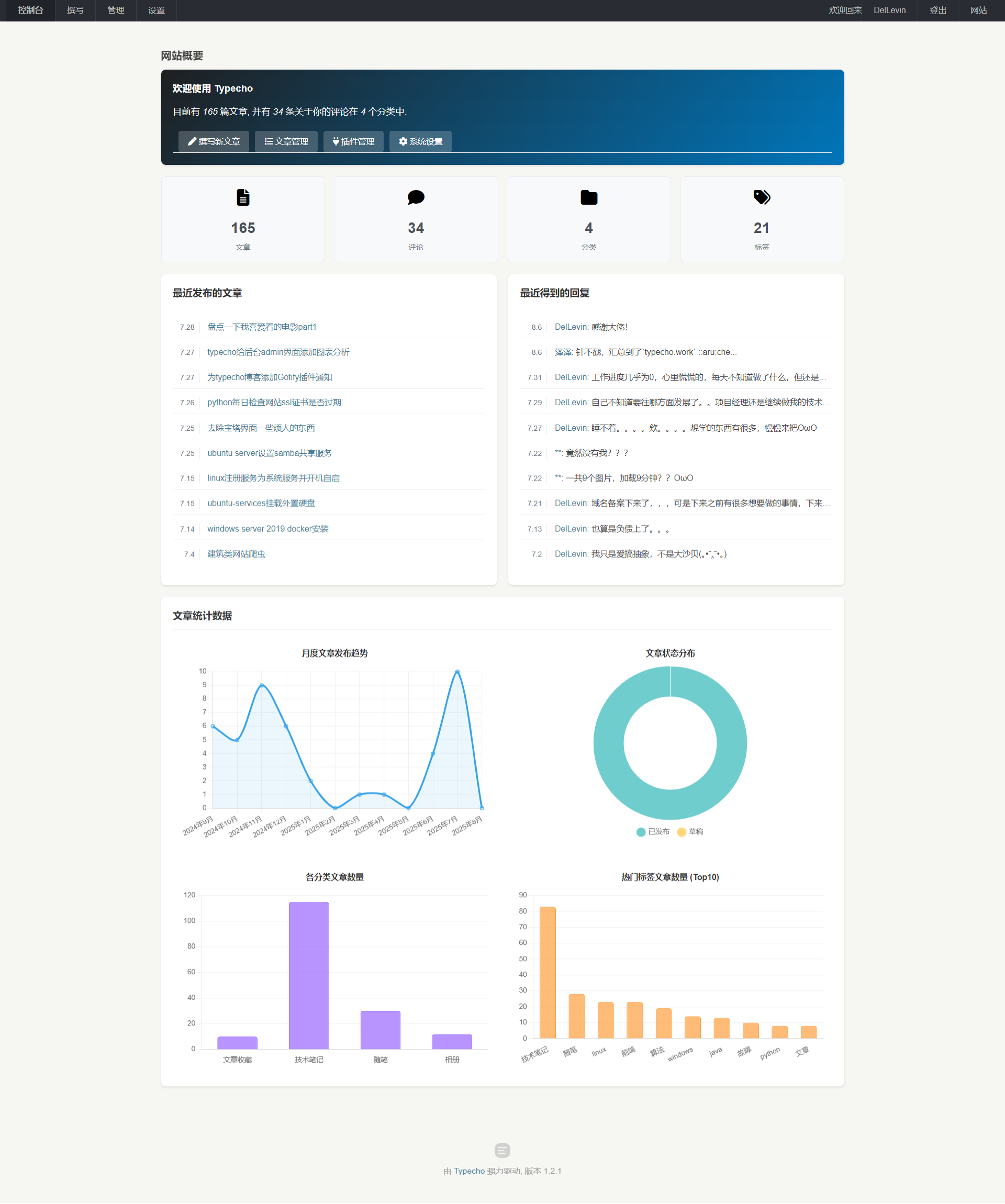
感兴趣的可以直接下载index.php文件覆盖/admin 下面的index.php文件
下载地址:
https://wonder1999.lanzouu.com/ikRiy32sfnah
<?php
include 'common.php';
include 'header.php';
include 'menu.php';
$stat = \Widget\Stat::alloc();
?>
<script src="https://blog.iletter.top/usr/blog_img/chart.js"></script>
<!-- 引入 Font Awesome 图标库 -->
<link rel="stylesheet" href="https://cdnjs.cloudflare.com/ajax/libs/font-awesome/6.5.0/css/all.min.css">
<style>
/* 自定义美化样式 */
.typecho-dashboard {
padding: 20px 0;
}
.card {
background-color: #fff;
border-radius: 8px;
box-shadow: 0 2px 4px rgba(0,0,0,0.1);
padding: 20px;
margin-bottom: 20px;
}
.card-title {
margin-top: 0;
margin-bottom: 15px;
padding-bottom: 10px;
border-bottom: 1px solid #eee;
color: #333;
font-size: 1.2em;
}
/* 欢迎区域 */
.welcome-card {
background: linear-gradient(135deg, #1f1f20 0%, #0076bb 100%);
color: white;
}
.welcome-card h3 {
color: white;
margin-top: 0;
}
.welcome-card p {
font-size: 1.1em;
margin-bottom: 20px;
}
.welcome-card a {
color: #fff;
text-decoration: underline;
}
.welcome-card a:hover {
text-decoration: none;
opacity: 0.9;
}
/* 快捷链接 */
#start-link {
list-style: none;
padding: 0;
margin: 0;
display: flex;
flex-wrap: wrap;
gap: 10px;
}
#start-link li {
margin: 0;
}
#start-link a {
display: inline-block;
padding: 8px 16px;
background-color: rgba(255, 255, 255, 0.2);
border-radius: 4px;
color: white !important;
text-decoration: none;
transition: background-color 0.3s ease;
}
#start-link a:hover {
background-color: rgba(255, 255, 255, 0.3);
}
#start-link .balloon {
background-color: #ff6b6b;
color: white;
border-radius: 10px;
padding: 2px 6px;
font-size: 0.8em;
margin-left: 5px;
}
/* 统计卡片 */
.stat-cards {
display: grid;
grid-template-columns: repeat(auto-fit, minmax(200px, 1fr));
gap: 15px;
margin-bottom: 20px;
}
.stat-card {
background-color: #f8f9fa;
border: 1px solid #e9ecef;
border-radius: 8px;
padding: 15px;
text-align: center;
transition: transform 0.2s ease, box-shadow 0.2s ease;
}
.stat-icon {
font-size: 2em;
margin-bottom: 10px;
color: #000000; /* 可根据不同类型调整颜色 */
}
.stat-number {
font-size: 1.8em;
font-weight: bold;
margin: 5px 0;
color: #495057;
}
.stat-label {
font-size: 0.9em;
color: #6c757d;
}
/* 最近列表 */
.latest-link ul {
list-style: none;
padding: 0;
margin: 0;
}
.latest-link li {
padding: 8px 0;
border-bottom: 1px solid #eee;
}
.latest-link li:last-child {
border-bottom: none;
}
.latest-link .title {
margin-left: 5px;
}
.latest-link span {
color: #6c757d;
font-size: 0.9em;
}
/* 图表区域 - 重新规划 */
.chart-container {
max-width: 1200px; /* 限制图表区域最大宽度 */
margin: 0 auto; /* 水平居中 */
display: flex;
flex-direction: column;
gap: 20px;
}
.chart-row {
display: flex;
gap: 20px;
flex-wrap: wrap;
}
.chart-box {
flex: 1;
min-width: 250px; /* 调整最小宽度以适应更多屏幕 */
background-color: #fff;
border-radius: 8px;
/*box-shadow: 0 2px 4px rgba(0,0,0,0.1);*/
padding: 15px;
display: flex;
flex-direction: column; /* 确保内部元素垂直排列 */
}
.chart-box h4 {
margin: 0 0 10px 0; /* 调整标题边距 */
text-align: center;
color: #333;
flex-shrink: 0; /* 防止标题被压缩 */
}
.chart-box canvas {
width: 100% !important; /* 确保画布宽度占满容器 */
max-height: 300px; /* 限制图表最大高度 */
flex-grow: 1; /* 画布占据剩余空间 */
}
/* 响应式调整 */
@media (max-width: 768px) {
.stat-cards {
grid-template-columns: repeat(2, 1fr);
}
.chart-row {
flex-direction: column; /* 小屏幕时堆叠 */
}
.chart-box {
min-width: 100%; /* 小屏幕时占满宽度 */
}
#start-link {
flex-direction: column;
}
}
/* 中等屏幕调整 - 让图表在中等屏幕也能两列显示 */
@media (min-width: 769px) and (max-width: 1100px) {
.chart-row {
/* 在这个范围内,允许换行,但.chart-box的flex行为会使其尽可能并排 */
}
.chart-box {
/* 可以微调 min-width 来控制换行点 */
min-width: calc(50% - 10px);
}
}
</style>
<div class="main">
<div class="container typecho-dashboard">
<?php include 'page-title.php'; ?>
<div class="row typecho-page-main">
<!-- 欢迎卡片 -->
<div class="col-mb-12" role="main">
<div class="card welcome-card">
<h3><?php _e('欢迎使用 Typecho'); ?></h3>
<p><?php _e('目前有 <em>%s</em> 篇文章, 并有 <em>%s</em> 条关于你的评论在 <em>%s</em> 个分类中.', $stat->myPublishedPostsNum, $stat->myPublishedCommentsNum, $stat->categoriesNum); ?></p>
<ul id="start-link" class="clearfix">
<?php if ($user->pass('contributor', true)): ?>
<li><a href="<?php $options->adminUrl('write-post.php'); ?>"><i class="fas fa-pen"></i> <?php _e('撰写新文章'); ?></a></li>
<?php if ($user->pass('editor', true) && 'on' == $request->get('__typecho_all_comments') && $stat->waitingCommentsNum > 0): ?>
<li>
<a href="<?php $options->adminUrl('manage-comments.php?status=waiting'); ?>"><i class="fas fa-comments"></i> <?php _e('待审核的评论'); ?></a>
<span class="balloon"><?php $stat->waitingCommentsNum(); ?></span>
</li>
<?php elseif ($stat->myWaitingCommentsNum > 0): ?>
<li>
<a href="<?php $options->adminUrl('manage-comments.php?status=waiting'); ?>"><i class="fas fa-comments"></i> <?php _e('待审核评论'); ?></a>
<span class="balloon"><?php $stat->myWaitingCommentsNum(); ?></span>
</li>
<?php endif; ?>
<?php if ($user->pass('editor', true) && 'on' == $request->get('__typecho_all_comments') && $stat->spamCommentsNum > 0): ?>
<li>
<a href="<?php $options->adminUrl('manage-comments.php?status=spam'); ?>"><i class="fas fa-trash-alt"></i> <?php _e('垃圾评论'); ?></a>
<span class="balloon"><?php $stat->spamCommentsNum(); ?></span>
</li>
<?php elseif ($stat->mySpamCommentsNum > 0): ?>
<li>
<a href="<?php $options->adminUrl('manage-comments.php?status=spam'); ?>"><i class="fas fa-trash-alt"></i> <?php _e('垃圾评论'); ?></a>
<span class="balloon"><?php $stat->mySpamCommentsNum(); ?></span>
</li>
<?php endif; ?>
<?php if ($user->pass('administrator', true)): ?>
<li><a href="<?php $options->adminUrl('manage-posts.php'); ?>"><i class="fas fa-list"></i> <?php _e('文章管理'); ?></a></li>
<li><a href="<?php $options->adminUrl('plugins.php'); ?>"><i class="fas fa-plug"></i> <?php _e('插件管理'); ?></a></li>
<li><a href="<?php $options->adminUrl('options-general.php'); ?>"><i class="fas fa-cog"></i> <?php _e('系统设置'); ?></a></li>
<?php endif; ?>
<?php endif; ?>
</ul>
</div>
</div>
<!-- 统计卡片 -->
<div class="col-mb-12">
<div class="stat-cards">
<div class="stat-card">
<a href="<?php $options->adminUrl('manage-posts.php'); ?>">
<div class="stat-icon"><i class="fas fa-file-alt"></i></div>
<div class="stat-number"><?php echo $stat->myPublishedPostsNum; ?></div>
<div class="stat-label"><?php _e('文章'); ?></div>
</a>
</div>
<div class="stat-card">
<a href="<?php $options->adminUrl('manage-comments.php'); ?>">
<div class="stat-icon"><i class="fas fa-comment"></i></div>
<div class="stat-number"><?php echo $stat->myPublishedCommentsNum; ?></div>
<div class="stat-label"><?php _e('评论'); ?></div>
</a>
</div>
<div class="stat-card">
<a href="<?php $options->adminUrl('manage-categories.php'); ?>">
<div class="stat-icon"><i class="fas fa-folder"></i></div>
<div class="stat-number"><?php echo $stat->categoriesNum; ?></div>
<div class="stat-label"><?php _e('分类'); ?></div>
</a>
</div>
<div class="stat-card">
<a href="<?php $options->adminUrl('manage-tags.php'); ?>">
<div class="stat-icon"><i class="fas fa-tags"></i></div>
<div class="stat-number"><?php echo $stat->tagsNum; ?></div>
<div class="stat-label"><?php _e('标签'); ?></div>
</a>
</div>
<!-- 可根据需要添加更多统计 -->
</div>
</div>
<!-- 左侧内容:最近文章 -->
<div class="col-mb-12 col-tb-6" role="complementary">
<div class="card">
<h3 class="card-title"><?php _e('最近发布的文章'); ?></h3>
<?php \Widget\Contents\Post\Recent::alloc('pageSize=10')->to($posts); ?>
<ul class="latest-link">
<?php if ($posts->have()): ?>
<?php while ($posts->next()): ?>
<li>
<span><?php $posts->date('n.j'); ?></span>
<a href="<?php $posts->permalink(); ?>" class="title"><?php $posts->title(); ?></a>
</li>
<?php endwhile; ?>
<?php else: ?>
<li><em><?php _e('暂时没有文章'); ?></em></li>
<?php endif; ?>
</ul>
</div>
</div>
<!-- 右侧内容:最近评论 -->
<div class="col-mb-12 col-tb-6" role="complementary">
<div class="card">
<h3 class="card-title"><?php _e('最近得到的回复'); ?></h3>
<ul class="latest-link">
<?php \Widget\Comments\Recent::alloc('pageSize=10')->to($comments); ?>
<?php if ($comments->have()): ?>
<?php while ($comments->next()): ?>
<li>
<span><?php $comments->date('n.j'); ?></span>
<a href="<?php $comments->permalink(); ?>" class="title"><?php $comments->author(false); ?></a>:
<?php $comments->excerpt(35, '...'); ?>
</li>
<?php endwhile; ?>
<?php else: ?>
<li><?php _e('暂时没有回复'); ?></li>
<?php endif; ?>
</ul>
</div>
</div>
<!-- 图表显示区域 -->
<div class="col-mb-12" role="complementary">
<div class="card">
<h3 class="card-title" style="color: #333;"><?php _e('文章统计数据'); ?></h3>
<div class="chart-container">
<div class="chart-row">
<!-- 月度发布图表 -->
<div class="chart-box">
<h4><?php _e('月度文章发布趋势'); ?></h4>
<canvas id="monthlyPostChart" height="250"></canvas>
</div>
<!-- 状态分布图表 -->
<div class="chart-box">
<h4><?php _e('文章状态分布'); ?></h4>
<canvas id="statusChart" height="250"></canvas>
</div>
</div>
<div class="chart-row">
<!-- 分类文章统计 -->
<div class="chart-box">
<h4><?php _e('各分类文章数量'); ?></h4>
<canvas id="categoryChart" height="250"></canvas>
</div>
<!-- 标签文章统计 -->
<div class="chart-box">
<h4><?php _e('热门标签文章数量 (Top10)'); ?></h4>
<canvas id="tagChart" height="250"></canvas>
</div>
</div>
</div>
</div>
</div>
</div>
</div>
</div>
<?php
include 'copyright.php';
include 'common-js.php';
?>
<script>
$(document).ready(function() {
<?php
// ==================== PHP 数据计算部分 ====================
// 1. 月度文章统计数据
$db = Typecho_Db::get();
// 月度文章统计
$select = $db->select()
->from('table.contents')
->where('type = ?', 'post')
->where('status = ?', 'publish');
$posts = $db->fetchAll($select);
$monthlyData = [];
$monthLabels = [];
$currentYear = date('Y');
$currentMonth = date('n');
// 初始化最近12个月的数据
for ($i = 11; $i >= 0; $i--) {
$year = $currentYear;
$month = $currentMonth - $i;
if ($month <= 0) {
$month += 12;
$year--;
}
$key = $year . '-' . str_pad($month, 2, '0', STR_PAD_LEFT);
$monthlyData[$key] = 0;
$monthLabels[$key] = $year . '年' . $month . '月';
}
// 统计实际数据
foreach ($posts as $post) {
$created = $post['created'];
$year = date('Y', $created);
$month = date('m', $created);
$key = $year . '-' . $month;
if (isset($monthlyData[$key])) {
$monthlyData[$key]++;
}
}
// 2. 文章状态统计
$published = $db->fetchObject($db->select(['COUNT(*)' => 'count'])
->from('table.contents')
->where('type = ?', 'post')
->where('status = ?', 'publish'))->count;
$draft = $db->fetchObject($db->select(['COUNT(*)' => 'count'])
->from('table.contents')
->where('type = ?', 'post_draft') // 注意:Typecho 草稿通常在 contents 表中 type 为 post_draft
// ->where('status = ?', 'publish') // 草稿状态通常不是 publish,可以省略或检查实际结构
)->count;
// 3. 分类文章统计
$categories = $db->fetchAll($db->select()->from('table.metas')->where('type = ?', 'category'));
$categoryData = [];
$categoryLabels = [];
foreach ($categories as $category) {
$count = $db->fetchObject($db->select(['COUNT(*)' => 'count'])
->from('table.relationships')
->where('mid = ?', $category['mid']))->count;
if ($count > 0) { // 只显示有文章的分类
$categoryLabels[] = $category['name'];
$categoryData[] = (int)$count;
}
}
// 4. 标签文章统计 (取前10个)
$tags = $db->fetchAll($db->select()->from('table.metas')->where('type = ?', 'tag'));
$tagData = [];
$tagLabels = [];
foreach ($tags as $tag) {
$count = $db->fetchObject($db->select(['COUNT(*)' => 'count'])
->from('table.relationships')
->where('mid = ?', $tag['mid']))->count;
if ($count > 0) {
$tagLabels[] = $tag['name'];
$tagData[] = (int)$count;
}
}
// 按数量排序,取前10个
array_multisort($tagData, SORT_DESC, $tagLabels);
$topTagLabels = array_slice($tagLabels, 0, 10);
$topTagData = array_slice($tagData, 0, 10);
// 准备图表数据
$chartMonthlyData = [
'labels' => array_values($monthLabels),
'values' => array_values($monthlyData)
];
$chartStatusData = [
'published' => (int)$published,
'draft' => (int)$draft
];
$chartCategoryData = [
'labels' => $categoryLabels,
'values' => $categoryData
];
$chartTagData = [
'labels' => $topTagLabels,
'values' => $topTagData
];
?>
// ==================== JavaScript 图表渲染部分 ====================
// 1. 月度文章图表
var monthlyData = <?php echo json_encode($chartMonthlyData); ?>;
if (monthlyData.labels && monthlyData.labels.length > 0) {
var ctx1 = document.getElementById('monthlyPostChart').getContext('2d');
new Chart(ctx1, {
type: 'line',
data: {
labels: monthlyData.labels,
datasets: [{
label: '每月发文数',
data: monthlyData.values,
borderColor: 'rgb(54, 162, 235)', // 调整为蓝色系
backgroundColor: 'rgba(54, 162, 235, 0.1)',
tension: 0.3, // 稍微增加曲线张力
fill: true
}]
},
options: {
responsive: true,
maintainAspectRatio: false,
scales: {
y: {
beginAtZero: true,
ticks: {
precision: 0
},
grid: {
color: 'rgba(0, 0, 0, 0.05)' // 网格线颜色
}
},
x: {
grid: {
color: 'rgba(0, 0, 0, 0.05)'
}
}
},
plugins: {
legend: {
display: false // 隐藏图例,因为只有一个数据集
},
tooltip: {
mode: 'index',
intersect: false
}
}
}
});
}
// 2. 文章状态图表
var statusData = <?php echo json_encode($chartStatusData); ?>;
if (statusData) {
var ctx2 = document.getElementById('statusChart').getContext('2d');
new Chart(ctx2, {
type: 'doughnut',
data: {
labels: ['已发布', '草稿'],
datasets: [{
data: [statusData.published, statusData.draft],
backgroundColor: [
'rgba(75, 192, 192, 0.8)', // 已发布 - 青色
'rgba(255, 205, 86, 0.8)', // 草稿 - 黄色
],
borderWidth: 1,
borderColor: '#fff'
}]
},
options: {
responsive: true,
maintainAspectRatio: false,
plugins: {
legend: {
position: 'bottom',
labels: {
padding: 15,
usePointStyle: true
}
},
tooltip: {
callbacks: {
label: function(context) {
return context.label + ': ' + context.raw;
}
}
}
},
cutout: '60%' // 增加中间空心部分
}
});
}
// 3. 分类文章图表
var categoryData = <?php echo json_encode($chartCategoryData); ?>;
if (categoryData.labels && categoryData.labels.length > 0) {
var ctx3 = document.getElementById('categoryChart').getContext('2d');
new Chart(ctx3, {
type: 'bar',
data: {
labels: categoryData.labels,
datasets: [{
label: '文章数量',
data: categoryData.values,
backgroundColor: 'rgba(153, 102, 255, 0.7)', // 紫色系
borderColor: 'rgba(153, 102, 255, 1)',
borderWidth: 1,
borderRadius: 4, // 条形圆角
barPercentage: 0.7, // 调整条形宽度
categoryPercentage: 0.8
}]
},
options: {
indexAxis: 'x', // 保持为垂直柱状图
responsive: true,
maintainAspectRatio: false,
scales: {
y: {
beginAtZero: true,
ticks: {
precision: 0
},
grid: {
color: 'rgba(0, 0, 0, 0.05)'
}
},
x: {
grid: {
display: false // 隐藏 X 轴网格线
}
}
},
plugins: {
legend: {
display: false
},
tooltip: {
mode: 'index',
intersect: false
}
}
}
});
}
// 4. 标签文章图表
var tagData = <?php echo json_encode($chartTagData); ?>;
if (tagData.labels && tagData.labels.length > 0) {
var ctx4 = document.getElementById('tagChart').getContext('2d');
new Chart(ctx4, {
type: 'bar',
data: {
labels: tagData.labels,
datasets: [{
label: '文章数量',
data: tagData.values,
backgroundColor: 'rgba(255, 159, 64, 0.7)', // 橙色系
borderColor: 'rgba(255, 159, 64, 1)',
borderWidth: 1,
borderRadius: 4,
barPercentage: 0.7,
categoryPercentage: 0.8
}]
},
options: {
indexAxis: 'x',
responsive: true,
maintainAspectRatio: false,
scales: {
y: {
beginAtZero: true,
ticks: {
precision: 0
},
grid: {
color: 'rgba(0, 0, 0, 0.05)'
}
},
x: {
grid: {
display: false
}
}
},
plugins: {
legend: {
display: false
},
tooltip: {
mode: 'index',
intersect: false
}
}
}
});
}
});
</script>
<script>
$(document).ready(function () {
});
</script>
<?php include 'footer.php'; ?>
其他插件推荐:
[post cid="405" /]
// ==UserScript==
// @name         宝塔面板优化 - 界面美化
// @namespace    http://tampermonkey.net/
// @version      1.3
// @description  移除指定 class 元素、替换特定 span 文字内容,并删除包含“需求反馈”的 span
// @match        http://152.136.153.72:9999/*
// @grant        none
// ==/UserScript==

(function () {
    'use strict';
    console.log('⚠ 脚本准备加载');

    // 定义需要移除的 class 组合
    const selectorsToRemove = [
        '.h-auto.mt-\\[1\\.2rem\\]',                         // h-auto mt-[1.2rem]
        '.svgtofont-desired.\\!mr-4px.\\!text-\\[16px\\]',   // svgtofont-desired !mr-4px !text-[16px]
        '.icon-end-time-free.icon-unpaid-ltd',                // icon-end-time-free icon-unpaid-ltd
        '.el-card.is-always-shadow.is-always-shadow.\\!border-\\[\\#efefef\\]',  // el-card is-always-shadow is-always-shadow !border-[#efefef]
        '.icon-end-time.icon-unpaid-ltd' // icon-end-time icon-unpaid-ltd
    ];

    // 移除指定 class 的元素
    const removeElementsByClass = () => {
        selectorsToRemove.forEach(selector => {
            document.querySelectorAll(selector).forEach(el => el.remove());
        });
    };

    // 替换指定 span 的文字内容
    const replaceSpanText = () => {
        const spanSelector = 'span.mr-1rem.ml-\\[-1\\.5rem\\]';
        document.querySelectorAll(spanSelector).forEach(span => {
            span.textContent = '精简版';
        });
    };

    // 删除 span/button 包含 指定字符 的 span 元素
    const removeSpansWithText = () => {
        const spans = document.querySelectorAll('span');
        spans.forEach(span => {
            if (span.textContent.trim() == '需求反馈') {
                span.remove();
            }
        });
        const buttons = document.querySelectorAll('button');
        buttons.forEach(span => {
            if (span.textContent.trim() == '立即体验') {
                span.remove();
            }
        });
    };
    // 删除指定class 包含置顶字符的元素
    const removeClassWithText =()=>{
        const parents = document.querySelectorAll('.header-child-tab');
        parents.forEach(span => {
            if (
                span.textContent.trim() == '安全检测' ||
                span.textContent.trim() == '违规词检测' ||
                span.textContent.trim() == 'PHP网站安全' ||
                span.textContent.trim() == '入侵防御' ||
                span.textContent.trim() == '系统加固' ||
                span.textContent.trim() == '扫描感知' ||
                span.textContent.trim() == '日志审计' ||
                span.textContent.trim() == 'SSH登录日志'
               ) {
                span.remove();
            }
        });
        const classparents = document.querySelectorAll('.el-collapse-item');
        classparents.forEach(span => {
            if (
                span.textContent.trim().includes('top5')
               ) {
                span.remove();
            }
        });
    }

    // 删除包含特定子元素的 el-col 元素
    const removeParentIfChildExists = () => {
        // 获取所有 el-col.el-col-6.wrapper-item 元素
        const parents = document.querySelectorAll('.el-col.el-col-6.wrapper-item');
        parents.forEach(parent => {
            // 检查子元素是否包含指定的 class
            const child = parent.querySelector('.absolute.-left-1\\.5.-top-1');
            if (child) {
                parent.remove(); // 移除父元素
            }
        });
    };


    // 综合执行函数
    const removeElements = () => {
        removeElementsByClass();
        replaceSpanText();
        removeSpansWithText();
        removeParentIfChildExists();
        removeClassWithText();
    };
    // 等待dom加载完毕后执行综合函数
    let timeoutId;
    const debouncedRemove = () => {
        clearTimeout(timeoutId);
        timeoutId = setTimeout(removeElements, 200);
    };
    let runCount = 0;
    const maxRuns = 5;
    const observer = new MutationObserver((mutations, obs) => {
        if (runCount >= maxRuns) {
            obs.disconnect();
            return;
        }
        obs.disconnect();
        debouncedRemove();
        runCount++;
        obs.observe(document.body, { childList: true, subtree: true });
    });
    observer.observe(document.body, { childList: true, subtree: true });
    // 点击一次执行一次综合函数
    let clickTimeout;
    document.addEventListener('click', () => {
        clearTimeout(clickTimeout);
        clickTimeout = setTimeout(removeElements, 200);
    });
    // 初始执行(延迟 1 秒,等待 DOM 加载)
    setTimeout(() => {
        removeElements();
    }, 1000);
})();取消归档页面的文章目录
找到主题文件下面的sidebar.php然后打开编辑,搜索到<!--非文章页面-->这个之后,然后会看到<?php echo PostContent::returnTOC($this->is('page'),false) ?>这个代码,这个就是非文章界面的文章目录显示。
<!--非文章页面-->
      <?php if (!($this->is('post'))) : ?>
      <section id="tag_cloud" class="widget widget_tag_cloud wrapper-md padder-v-none clear">
       <h5 class="widget-title m-t-none"><?php _me("标签云") ?></h5>
          <div class="tags l-h-2x panel wrapper-sm padder-v-ssm">
              <?php Typecho_Widget::widget('Widget_Metas_Tag_Cloud','ignoreZeroCount=1&limit=30')->to($tags); ?>
              <?php if($tags->have()): ?>
                  <?php while ($tags->next()): ?>
                      <a href="<?php $tags->permalink();?>" class="label badge"><?php $tags->name(); ?></a>
                  <?php endwhile; ?>
              <?php endif; ?>
          </div>
      </section>

        <!--<?php echo PostContent::returnTOC($this->is('page'),false) ?>-->
        <?php
            // 获取当前页面的路径
            $currentUrlPath = parse_url($this->permalink, PHP_URL_PATH);
            // 判断是否为页面,且 URL 中不包含 "archive"
            if ($this->is('page') && substr($currentUrlPath, -12) !== 'archive.html' ) {
                echo PostContent::returnTOC(true, false);
            }
        ?>


<?php else: ?>如果你想对具体方法进行操作,可以找到libs/content/PostContent.php 这个就是相应的右侧边栏的一些用到的方法。
去除掉友情链接的内页链接
友情链接嘛,就是links,那我们就在主题文件夹下搜索links
<ul class="nav no-padder b-b">
                    <li class="nav-item active"><a class="nav-link" href data-toggle="tab" data-target="#my-info"><?php
                            _me("申请友链")
                            ?></a></li>
                    <!--<li class="nav-item"><a class="nav-link" href data-toggle="tab" data-target="#tab_2"><?php _me("内页链接") ?></a></li>-->
                    <li class="nav-item"><a class="nav-link" href data-toggle="tab" data-target="#tab_4"><?php _me("全站链接") ?></a></li>
                    <li class="nav-item"><a class="nav-link" href data-toggle="tab" data-target="#tab_3"><?php _me("推荐链接") ?></a></li>
                </ul>
这里就是对链接的显示,注释掉你不喜欢的就可以了。
注释完毕后,如果你有强迫症的话,可以想我一样进行接下来的更改。针对后台管理的友情链接的操作。找到插件里面的handsome插件,找到Plugin.php这个文件,里面有个form函数,就是他,你若找到的话可以看到该函数下面有一部分的代码。注释掉你不喜欢的就可以了。
$sort = new Typecho_Widget_Helper_Form_Element_Select('sort', array(
            'ten' => '全站链接,首页左侧边栏显示',
            // 'one' => '内页链接,在独立页面中显示(需要新建独立页面<a href="https://handsome2.ihewro.com/#/plugin" target="_blank">友情链接</a>)',
            'good' => '推荐链接,在独立页面中显示',
            'others' => '失效链接,不置输出,标注暂时失效的友链'
        ), 'ten', _t('链接输出位置*'), '选择友情链接输出的位置');
左侧边栏导航 配置
打开主题的后台,可以参考本博客的配置进行修改,左侧边栏的图标用的是feather图标,点击链接跳转查看,https://feathericons.com/)
[
    {
        "name": "云盘",
        "feather": "cloud",
        "link": "https://alist.ittoolman.com/",
        "target": "_blank"
    },
    {
        "name": "图床",
        "feather": "inbox",
        "link": "https://img.ittoolman.com/",
        "target": "_blank"
    },
    {
        "name": "相册",
        "feather": "image",
        "link": "https://blog.iletter.top/index.php/category/image/",
        "target": "_self"
    },
    {
        "name": "分类",
        "feather": "layout",
        "sub": [
            {
                "name": "随笔",
                "feather": "edit",
                "target": "_self",
                "link": "https://blog.iletter.top/index.php/category/sui-bi/"
            },
            {
                "name": "技术笔记",
                "feather": "monitor",
                "target": "_self",
                "link": "https://blog.iletter.top/index.php/category/ji-shu-bi-ji/"
            },
            {
                "name": "文章收藏",
                "feather": "scissors",
                "target": "_self",
                "link": "https://blog.iletter.top/index.php/category/wen-zhang/"
            }
        ]
    },
    {
        "name": "归档",
        "feather": "archive",
        "link": "https://blog.iletter.top/index.php/archive.html",
        "target": "_self"
    },
    {
        "name": "时光机",
        "feather": "clock",
        "link": "https://blog.iletter.top/index.php/cross.html",
        "target": "_self"
    },
    {
        "name": "友人帐",
        "feather": "users",
        "link": "https://blog.iletter.top/index.php/links.html",
        "target": "_self"
    },
    {
        "name": "关于我",
        "feather": "coffee",
        "link": "https://blog.iletter.top/index.php/start-page.html",
        "target": "_self"
    }
]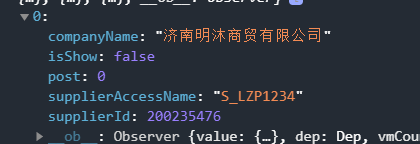
这里是有值的,但
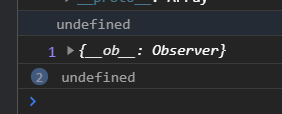
到了前端就没有了,卧槽,太神奇了是不是。打印一下看看
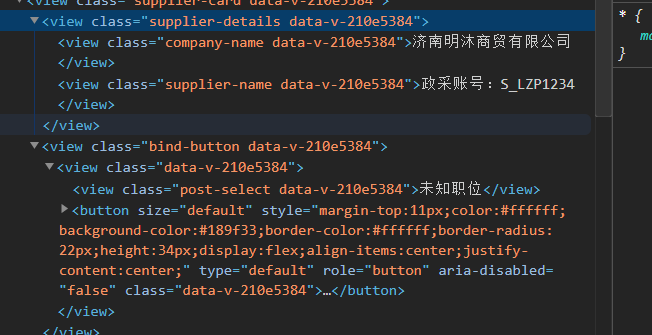
打印出来传入值竟然是undefined而不是0,一定是闹鬼了。。。
最后再不断定位错误的时候,发现是这里的毛病
post: item.post || '', // 添加 post 属性,默认值为空字符串原因是当数值为0的时候自己就默认是false
0在布尔上下文中被认为是假值,因此 item.post||‘’ 会在 item.post 为 0 时返回空字符串。所以说为了保留0,需要改成
item.post !== undefined ? item.post : ''来确保仅在 item.post 是 undefined 时返回空字符串。
下面贴一下源代码
<template>
<view>
<!-- 绑定个人信息 -->
<u-popup :show="localBindCompShow" @close="onClickOverlayClose" @open="localBindCompShow =true" mode="center"
round="20" :closeOnClickOverlay="true">
<view class="bindCompCard">
<view class="header-container">
<view class='header-button'>
<u-button type="info" size="5" icon="close" @click="onClickOverlayClose" :plain="true"
:hairline="true"></u-button>
</view>
<view class="header-text">绑定企业信息</view>
<u-tabs :list="bindCompTabList" @click="selectTab" class="tabs"></u-tabs>
</view>
<view v-if="!bindCompNewShow">
<view class="supplier-container">
<view v-for="(item, index) in itemsToDisplay" :key="index" class="supplier-card">
<view class="supplier-details">
<view class="company-name">{{ item.companyName }}</view>
<view class="supplier-name">政采账号:{{ item.supplierAccessName }}</view>
</view>
<view class="bind-button">
<view v-if="!item.isShow">
<view class="post-select">
{{ getPostText(item.post) }}
</view>
<button size="default" type="default"
style="margin-top: 20rpx;color:#ffffff;background-color:#189f33;border-color:#ffffff;border-radius: 40rpx;height: 60rpx;display: flex;align-items: center;justify-content: center;">已绑定</button>
</view>
<view v-if="item.isShow">
<view class="post-select" v-if="item.isShow">
<uni-data-select v-model="item.post" :localdata="postList"
placeholder="选择职位"></uni-data-select>
</view>
<button size="default" type="default" @click="submitBindCompCard(item)"
style="margin-top: 20rpx;color:#ffffff;background-color:#4874cb;border-color:#ffffff;border-radius: 40rpx;height: 60rpx;display: flex;align-items: center;justify-content: center;">提交绑定</button>
</view>
</view>
</view>
</view>
</view>
<view v-if="bindCompNewShow">
<u--form labelPosition="left" :model="formBindComp">
<u-form-item label="政采网账号" prop="formBindComp.supplierAccessName" borderBottom labelWidth='200'>
<u--input v-model="formBindComp.supplierAccessName" border="none"></u--input>
</u-form-item>
<u-form-item label="职位" prop="formBindComp.post" borderBottom labelWidth='200'>
<uni-data-select v-model="formBindComp.post" :localdata="postList"
placeholder="选择职位"></uni-data-select>
</u-form-item>
</u--form>
<!-- <u-button type="success">提交</u-button> -->
<button size="default" type="default" @click="submitBindComp"
style="margin-top: 40rpx;color:#ffffff;background-color:#4874cb;border-color:#ffffff;border-radius: 40rpx;height: 60rpx;display: flex;align-items: center;justify-content: center;">提交绑定</button>
</view>
</view>
</u-popup>
</view>
</template>
<script>
import {
mapState,
mapMutations
} from 'vuex';
import {
getFieldList,
postBindEnterprise,
getUserBindComp,
getUserHaveBindComp,
} from "@/api/user.js";
export default {
name: 'BindComp',
props: {
bindCompShow: {
type: Boolean,
default: true
},
userId: {
type: String,
},
itemList: {
type: Array,
default: () => []
}
},
computed: {
...mapState("user", ["token", "tokenExpire", "userInfo"]),
localBindCompShow: {
get() {
return this.bindCompShow;
},
set(val) {
this.$emit('update:bindCompShow', val)
}
},
itemsToDisplay() {
let list = this.itemList.length > 0 ? this.itemList : this.supplierList;
// 处理 list,添加 post 和 isShow 属性
let processedList = list.map(item => ({
...item,
post: item.post !== undefined ? item.post : '', // 添加 post 属性,保留原值或默认值为空字符串
isShow: item.isShow !== undefined ? item.isShow : true // 添加 isShow 属性,默认值为 true
}));
return processedList;
}
},
data() {
return {
supplierList: [],
bindCompNewShow: false,
bindCompTabList: [{
name: '政采企业信息绑定',
},
{
name: '绑定其他企业',
}
],
postList: [],
formBindComp: {
supplierAccessName: '',
post: '',
userId: '',
}
};
},
mounted() {
this.fieldListGet();
if (this.userInfo.id != undefined) {
this.userBindCompGet();
}
},
created() {
},
methods: {
...mapMutations("user", ["setUserInfo"]),
async submitBindComp() {
this.formBindComp.userId = this.userId
if (!this.formBindComp.userId) {
this.formBindComp.userId = this.userInfo.id
}
if (this.formBindComp.userId == "") {
uni.$u.toast('绑定失败,请尝试重新登陆后绑定!');
return;
}
if (this.formBindComp.supplierAccessName === "") {
uni.$u.toast('政采网账号不能为空!');
return;
}
if (this.formBindComp.post === "") {
uni.$u.toast('职位信息不能为空!');
return;
}
const {
code,
msg,
data
} = await postBindEnterprise(this.formBindComp);
if (code === 0) {
// console.log(data)
uni.$u.toast('绑定企业成功!');
setTimeout(() => {
this.$emit('close-popup');
uni.reLaunch({
url: '/pages/index/index'
});
}, 1000);
}
},
async submitBindCompCard(item) {
if (item.post === undefined || item.post === "") {
uni.$u.toast('企业职位不能为空!');
return;
}
let userID = this.userId;
if (!userID) {
userID = this.userInfo.id
}
const params = {
supplierAccessName: item.supplierAccessName,
post: item.post,
userId: userID,
}
console.log(params)
const {
code,
msg,
data
} = await postBindEnterprise(params);
if (code === 0) {
// console.log(data)
// 更新 item 的 isShow 属性
this.$set(item, 'isShow', false);
uni.$u.toast('绑定' + item.companyName + '成功!');
// 更新绑定企业
this.userBindCompGet();
}
},
onClickOverlayClose() {
this.$emit('close-popup');
},
//获取用户下面的政采企业信息
async userBindCompGet() {
try {
// 如果resBindComp里面包含resHaveBind的数据,那么就设置该企业已经绑定好了
const resHaveBind = await getUserHaveBindComp();
const resBindComp = await getUserBindComp();
if (resHaveBind.code === 0 && resBindComp.code === 0) {
const haveBindMap = new Map();
resHaveBind.data.forEach(item => {
haveBindMap.set(item.supplierId, item.post);
});
this.supplierList = resBindComp.data.map(item => {
if (haveBindMap.has(item.supplierId)) {
return {
...item,
post: haveBindMap.get(item.supplierId),
isShow: false
};
}
return item;
});
console.log(this.supplierList);
}
} catch (error) {
console.error('获取用户绑定企业信息失败', error);
}
},
//获取职位信息
async fieldListGet() {
const {
code,
msg,
data
} = await getFieldList({
fieldName: "register_post"
});
if (code === 0 && data) {
// console.log(data)
this.postList = data.map(post => {
return {
value: post.dictCode,
text: post.dictName
}
});
// console.log(this.postList)
}
},
getPostText(postValue) {
const postItem = this.postList.find(post => post.value === postValue);
// console.log(postValue, postItem)
return postItem ? postItem.text : '未知职位';
},
selectTab(item) {
// console.log(item.name)
if (item.name == "绑定其他企业") {
this.bindCompNewShow = true;
} else {
this.bindCompNewShow = false;
}
},
},
}
</script>
<style scoped lang="less">
.bindCompCard {
width: 650rpx;
padding: 20rpx;
display: flex;
flex-direction: column;
justify-content: center;
align-items: center;
text-align: center;
}
.header-container {
display: flex;
flex-direction: column;
align-items: center;
width: 100%;
margin-bottom: 20rpx;
}
.header-button {
position: absolute;
width: 80rpx;
top: 0;
right: 5px;
margin: 10rpx;
}
.header-text {
font-size: 36rpx;
margin-bottom: 10rpx;
text-align: center;
width: 100%;
}
.tabs {
width: 100%;
}
// ------------------------
.supplier-container {
display: flex;
flex-direction: column;
gap: 20rpx;
padding: 20rpx;
height: 600rpx;
overflow: auto;
}
.supplier-card {
background: #fff;
border-radius: 10rpx;
box-shadow: 0 2rpx 5rpx rgba(0, 0, 0, 0.1);
padding: 20rpx;
display: flex;
// flex-direction: column;
gap: 10rpx;
}
.supplier-details {
margin-top: 27rpx;
width: 360rpx;
display: flex;
flex-direction: column;
gap: 10rpx;
}
.company-name,
.supplier-name {
white-space: nowrap;
overflow: hidden;
text-overflow: ellipsis;
width: 100%;
}
.company-name {
font-size: 32rpx;
font-weight: bold;
color: #333;
}
.supplier-name {
font-size: 32rpx;
color: #666;
}
.post-select {
margin-top: 10rpx;
width: 222rpx;
}
.bind-button {
margin-left: 10rpx;
}
</style>html
        <div class="contactPerson_bottom_div" id="fuDiv">
            <div class="dragDiv" @mousedown="dragEagle" >
                    <el-icon><SemiSelect /></el-icon>
            </div>
         </div>
script
dragEagle(e) {
            var targetDiv = document.getElementById('fuDiv');
            //得到点击时该地图容器的宽高:
            var targetDivHeight = targetDiv.offsetHeight;
            var startX = e.clientX;
            var startY = e.clientY;
            document.onmousemove = function (e) {
                e.preventDefault();
                //得到鼠标拖动的宽高距离:取绝对值
                var distY = Math.abs(e.clientY - startY);

                //往上方拖动:
                if (e.clientY < startY) {
                    targetDiv.style.height = (targetDivHeight + distY) + 'px';
                }

                //往下方拖动:
                if (e.clientX < startX && e.clientY > startY) {
                    targetDiv.style.height = targetDivHeight - distY + 'px';
                }

                if (parseInt(targetDiv.style.height) >= 800) {
                    targetDiv.style.height = 800 + 'px';
                }
                if (parseInt(targetDiv.style.height) <= 320) {
                    targetDiv.style.height = 320 + 'px';
                }
            }
            document.onmouseup = function () {
                document.onmousemove = null;
            }
        },
css
.contactPerson_bottom_div {
    position: absolute;
    bottom: 0;
    left: 0;
    right: 0;
    border-top-style: solid;
    border-color: black;
    background: rgb(255, 255, 255);
    color: rgb(0, 0, 0);
    z-index: 99;
    height: 320px;
    overflow-y: auto;/* 允许垂直滚动 */
}
.dragDiv{
     height:10px;
    display: flex;
    align-items: center;
    justify-content: center;
}
.dragDiv:hover {
    /* background-color: #666; */
    cursor: pointer;/* 在hover的时候,鼠标指针变成手 */
}
首先针对需要设置的div添加一个id,再通过getElementById获取到目标div。
然后在内部添加一个div,可以设置成自己想要的形式,做明显的标记使用。针对这个div设置操作活动@mousedown。也就是当鼠标按下去的时候调用此dragEagle方法,在此之前一定要传入对象参数e。
var targetDivHeight = targetDiv.offsetHeight;: 这行代码获取了目标 div 元素的当前高度,并将其存储在 targetDivHeight 变量中。
var startX = e.clientX; 和 var startY = e.clientY;: 这两行代码分别记录了鼠标点击位置的横坐标(X坐标)和纵坐标(Y坐标),用于后续计算鼠标拖动的距离。
document.onmousemove = function (e) { ... }: 这是一个鼠标移动事件处理程序,当用户按住鼠标左键并移动时,会触发这个事件处理程序。在这个处理程序中,计算了鼠标拖动的距离,并根据拖动的方向来改变目标 div 元素的高度。
e.preventDefault();: 这一行代码用于防止浏览器默认的拖拽行为,确保我们自己的逻辑生效。- 通过比较鼠标当前的
e.clientY和初始点击时的startY来计算垂直方向上的拖动距离distY。 - 接下来的条件判断分别处理向上拖动和向下拖动的情况。如果鼠标向上拖动,就增加目标
div的高度,如果鼠标向下拖动,就减小目标div的高度。这样可以实现调整高度的效果。 - 最后的两个条件判断用于限制目标
div的最小和最大高度,以避免高度超出一定范围
document.onmouseup = function () { ... }: 这是鼠标释放事件处理程序,在鼠标左键释放时触发。它用于清除鼠标移动事件处理程序,即当鼠标释放后停止拖动。
在这之中
                if (parseInt(targetDiv.style.height) >= 800) {
                    targetDiv.style.height = 800 + 'px';
                }
                if (parseInt(targetDiv.style.height) <= 320) {
                    targetDiv.style.height = 320 + 'px';
                }
这一段是限制div拖动的最大高度和最小高度
]]>onClick 调用第二个页面中的 updateBankToUser 方法,我们可以使用事件总线来实现跨组件通信。在Vue 3中,我们可以使用 mitt 库来创建事件总线。首先,安装 mitt 库:
npm install mitt然后,我们可以创建一个全局的事件总线,并在第二个页面中将 updateBankToUser 方法注册为一个事件处理程序,然后在第一个页面的 onClick 方法中触发这个事件,从而调用第二个页面中的方法。
以下是示例代码:
创建全局事件总线 bus.ts:
// bus.ts
import mitt from 'mitt';

export const bus = mitt();
第二个页面 user.vue:
<template>
  <div>
    <!-- ...其他代码... -->
    <el-button @click="updateBankToUser">更新银行的用户</el-button>
  </div>
</template>

<script setup>
import { bus } from './bus';

const updateBankToUser = async () => {
  console.log('更新银行的用户');
  // 在这里执行您的业务逻辑
}
bus.on('callUpdateBankToUser', updateBankToUser);
</script>
第一个页面 parent.vue:
<template>
  <div>
    <el-button @click="onClick">点击调用第二个页面的方法</el-button>
  </div>
</template>

<script setup>
import { bus } from './bus';

const onClick = () => {
  console.log('调用第二个页面的方法');
  // 在这里执行您的业务逻辑
  bus.emit('callUpdateBankToUser');
}
</script>
在这个示例中,我们在 bus.ts 中创建了一个全局事件总线 bus。然后在第二个页面 user.vue 中,我们将 updateBankToUser 方法注册为名为 'callUpdateBankToUser' 的事件处理程序。在第一个页面 parent.vue 中的 onClick 方法中,我们使用 bus.emit 触发了 'callUpdateBankToUser' 事件,从而调用了第二个页面中的 updateBankToUser 方法。
通过这种方式,您可以在不直接引用第二个页面的情况下,实现跨组件调用其中的方法。
什么是全局事件总线bus.ts import mitt from 'mitt'; export const bus = mitt(); 两行的作用是啥
在这里,bus.ts 文件中的两行代码用来创建全局事件总线。全局事件总线是一个简单的事件管理器,它可以用于在应用程序中实现组件之间的通信,特别是当组件之间没有直接父子关系时。
具体来说,这两行代码的作用是:
import mitt from 'mitt';: 这里我们导入了mitt库,它是一个简单、小巧的 JavaScript 事件库。mitt库允许我们创建事件总线,以便在应用程序的任何地方都可以访问该事件总线。export const bus = mitt();: 在这里,我们创建了一个全局的事件总线bus并将其导出。通过mitt()调用,我们创建了一个新的事件总线实例,可以用来管理事件的注册、触发和取消。
总结起来,bus.ts 文件中的这两行代码的目的是创建一个全局的事件总线,以便在应用程序的任何地方都可以使用它进行组件之间的通信。通过这个全局事件总线,我们可以在不直接引用其他组件的情况下,实现组件之间的方法调用和数据传递。